Social Icons

Showing posts with label Microsoft. Show all posts

Thursday, November 27, 2014

Latest Tech News-Part 1


Ok so there were a lot of tech news last week so this will be made into 2 videos and posts and this is the first one, the second vid's and post will be link- there is a lot of news to cover so lets get started

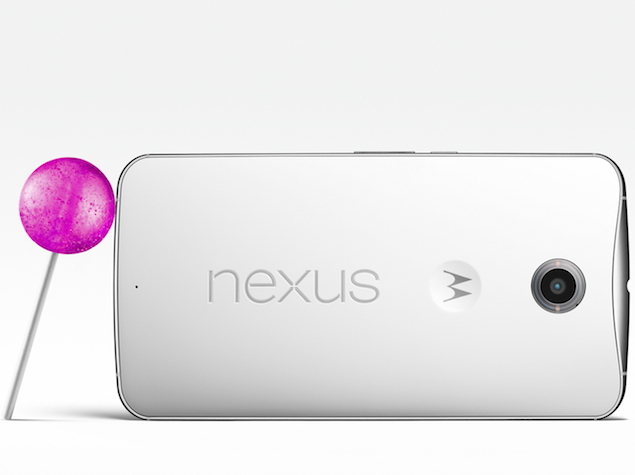
1.Google Nexus 6 price in India has been officially confirmed thanks to the listing of the smartphone in the Play Store. Google Nexus 6 32GB variant has been priced in India at Rs. 44,000 for the 32GB variant, while the 64GB variant will be available in India at a price of Rs. 49,000. The smartphone will be available in two colours: Midnight Blue and Cloud White. There's no word yet on when the smartphone will be start shipping in India, but with the price now listed on the Play Store, the official launch should happen within the next week or so

Google Nexus 6 has the following specs

  • Manufactured by Motorola, 
  • Comes with a 5.96-inch QHD (1440x2560 pixels) display at 493PPI. 
  • The smartphone is powered by a 2.7GHz quad-core Qualcomm Snapdragon 805 processor 
  • 3GB RAM.  
  • 32GB and 64GB internal storage options. 
  • The smartphone comes with 13-megapixel and 2-megapixel rear and front cameras respectively.


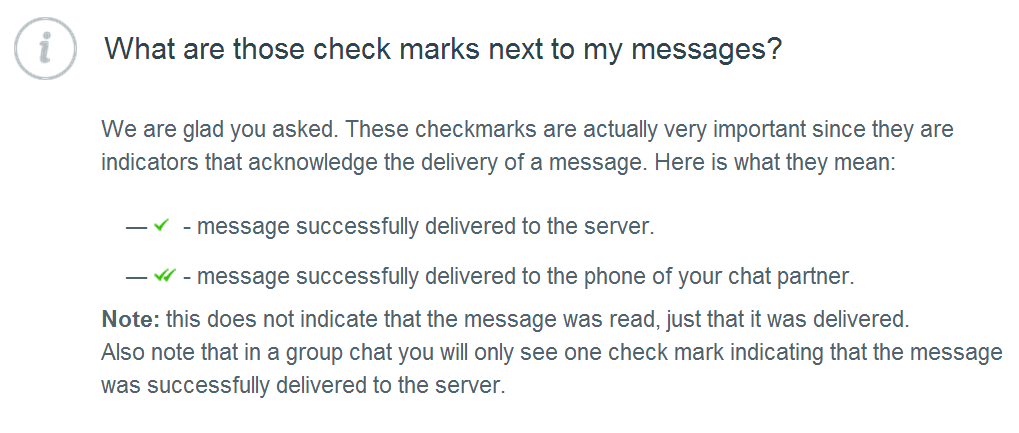
2.Whatsapp the leading messages app has now starting to show 2 blue tick marks that mean the recipient has read your message


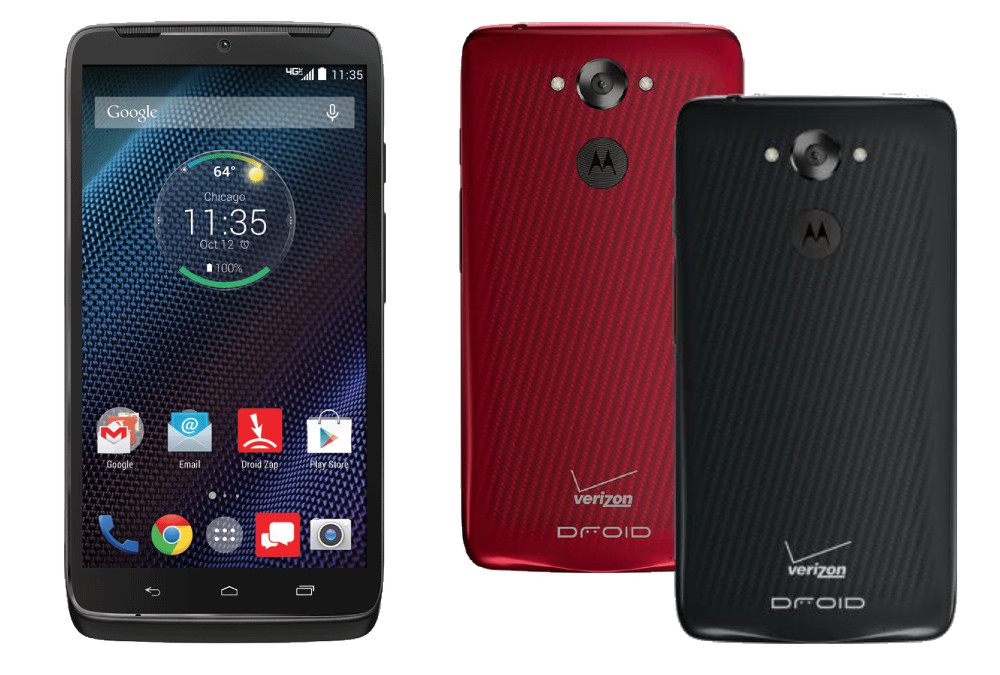
3.Motorola launched a new phone the Moto Maxx the global variant of droid turbo that was made only for us's carrier Verizon. the phone launched in Brazil a few days ago for BRL 2,199 that's about 857$ and 56,000 rupees approximately. the phone is about to reach mexico by mid November and other Latin american countries soon

The specs of the phone are

  • the back features a 'Ballistic Nylon' build. The company says, "It's a high-quality, durable material with a distinctive texture and rich colour - you might recognize it from outdoor gear, like backpacks."
  • Moto Maxx also features a layer of DuPont Kevlar fibre, and is claimed to be protected inside and out with water-repellent nano-coating.
  • 3900mAh battery-The company claims that the smartphone can deliver up to 48 hours of mixed usage. Much like the Droid Turbo, the Moto Maxx also supports Motorola's Turbo Charger, a new accessory from the company stables that is said to provide 8 hours of battery life in just 15 minutes of charging.
  • Android 4.4.4 KitKat-based 
  • 5.2-inch QHD (1440x2560 pixels) display offering a pixel density of 565ppi; a Corning Gorilla Glass 3 protective layer; 
  • Quad-core Qualcomm Snapdragon 805 processor clocked at 2.7GHz coupled with an Adreno 420 GPU and 
  • 3GB of RAM; 
  • 21-megapixel rear auto focus camera with f/2.0 aperture and dual-LED flash, 
  • 2-megapixel front camera. 
  • Connectivity options on the Moto Maxx are 4G LTE with LTE Cat 4, Bluetooth, Wi-Fi, Micro-USB, and GSM/ EDGE/ HSPA+. 
  • the smartphone comes only in one storage variant - 64GB.
  • It also includes features from the Moto X (Gen 2) such as the Moto Display, which can wake up the phone to show the time and notifications when user's reach for the phone.


4.Microsoft has released a press statement that their office suit which comprises of word, power point and other hit apps will be offered for free on android and iOS, without the need for an Office 365 subscription.


5. Another Microsoft related news-as you might know that Microsoft has bought Nokia a not so long while ago, but u must be thinking what is the news here? well the news is the first lumia phone without the Nokia branding is all set to launch on 11th that is tomorrow what are the specs and what all is announced thou shall wait and watch my channel for news on this


Part 1        Part 2

Wednesday, June 11, 2014

Microsoft Announces New Surface Pro 3

Microsoft recently announced the Surface Pro 3, the successor to the Surface Pro 2, which was launched lesser than last year.
Here are its specifications:-

  • Compatible upto i7 processors
  • Thinnest Core product ever created
  • Measures 0.35 inch thick without the keyboard cover
  • 12 Inches screen-2160x1440 pixel resolution
  • Comes with a multi- position kickstand
  • Mainly will be used for note taking
  • The stylus has been made by N-trig
  • Has 256 points of pressure sensitivity
  • Clicking the button OneNote is opened
  • Prices start at $799, with pre-orders have started from May 21. 
  • The Surface Pro 3 will hit the streets on on June 20.


Thursday, May 1, 2014

Microsoft Planning To Bring Xbox 360 Emulation To Xbox One

The Microsoft Xbox One, which released towards the latter stages of last year, already boasts a sizeable catalog titles. But while those rocking the old Xbox 360 cannot enjoy the cutting-edge graphics offered by the latest machine, the range of games is much broader, and naturally, many gaming fans have appealed for Microsoft to introduce backwards compatibility with those old 360 games. Apparently, partner development lead Frank Savage suggested at last week’s BUILD that the idea of an Xbox 360 emulator is not out of the question, although it remains unclear as to if, when or how such a feature would be achieved.

To an outsider, it may seem like a very straightforward concept that a newer, more powerful system should run older games without too much issue. But in reality, there are several kinks that would need to be worked out before an emulator could be implemented, namely the fact that the Xbox one runs on X86 architecture whilst its predecessor runs PowerPC. Bridging the gap would be both time-consuming and tedious, and even though purists would love to see backwards compatibility, it remains to be known whether the software maker sees any value in it.


On the topic, Savage didn’t rule anything out, tentatively suggesting that plans were at discussion stage. “We’re not done thinking them through yet, unfortunately,” he said, going on to note that “it turns out to be hard to emulate the PowerPC stuff on the X86 stuff” and that while “there’s nothing to announce,” he would “love” to see it happen.

This likely echoes the sentiments of thousands of gamers, stuck with stacks of titles but forced to maintain two consoles in order to play both old and new. The Xbox 360 has no problem playing most old Xbox games, but given the key technological alterations this time around, getting the Xbox One to play nicely with Xbox 360 games will be a great deal tougher.

Given the furore surrounding certain used games polices in the run-up to the Xbox One’s release, it’s clear that the Redmond company isn’t thrilled by the idea of facilitating these kinds of features. With that said,`we also saw during the months leading up to the launch that the voice of the masses is one to be listened and adhered to, and if Microsoft begins to notice the demand, then nothing can be ruled out at this stage.

Would you like to see an Xbox 360 emulator release for the Xbox One?

Thursday, April 3, 2014

Microsoft Conference-2/4/2014-Part 2

Microsoft announced the following in their build conference yesterday

Windows 8.1 Update

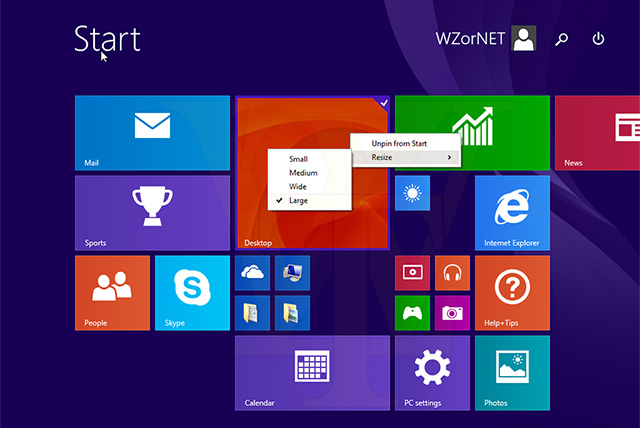
Microsoft unfortunately did not reveal too many details for the update to Windows 8.1, and also gave it no other name than Windows 8.1 Update - essentially ruling out a Windows 8.1 Update 2. The biggest change is the focus on UI-optimisation for mouse and keyboard users. This includes everything from Modern apps now displaying in the task bar (by pinning), to complete mouse control over apps in the Modern UI interface. The Windows Store UI will also be made mouse-optimised.


Apart from boot/resume straight to desktop, Belfiore ran through a few other features, such as Internet Explorer's Enterprise Mode, the synced Bing-Cortana interests. The biggest reveal however, came after the developer side of the conference had begun, with the introduction of Universal Windows apps.

Universal Windows apps can be made by developers using a common code for PC, smartphones and tablets, via an updated Visual Studio 2013 suite. With this feature, Microsoft says it is not expecting developers to code one app that tries to work well on all form factors, but rather, one that is easily adaptable to the various Windows platforms, with the job of porting made easier with the common Windows runtime environment and programming languages used in developing them.


Here is a gist of the new features, tweaks and customization ported to Windows 8.1 Update 1:

Boot to Desktop by Default

The modern Start Screen that had bewildered new PC users trying to adopt the latest Windows platform is no longer a concern, as Microsoft has tweaked the system settings in Windows 8.1 Update 1 to make it boot directly to Desktop by default. Now the interface looks more traditional and familiar right out of the box.

Support for Universal Apps

The new Update 1 for Windows 8.1 brings support for universal apps, wherein an app created for one device can run on other devices including Windows, Windows Phone and Xbox One.

Windows Store App Navigation Gets Simpler

Windows Store App Navigation has become simpler and more interactive with the introduction of more clickable elements in Windows 8.1 update 1.

Web Browsing in Sync across Devices

Internet Explorer 11 which is part of the new update brings seamless browsing through the web, enabling the user to continue from the point where he/she left off.

Improved Taskbar and Start Screen

In line with rumours, Windows Store apps can now be pinned to the Taskbar, thereby doing away with the limitation associated with customising the quick-access feature.

In addition, the Start Screen features new Power and Search buttons at the top-right corner of the UI which minimises the effort of navigation with the mouse every time.

The top-right corner of any running app now has the familiar 'X' button to close the app. The Taskbar can also be accessed directly from the Start Screen, which is again directed at minimising effort and making the interface more user-friendly.

Performance Improvements

Apart from tweaking the UI functionality for the desktop, the new Update 1 also comes with a handful of performance improvements such as better memory efficiency via Process Lifetime Manager and better system compatibility with Internet Explorer.

Windows for Free on Smaller Phones and Tablets

There is more good news for budget consumers looking to buy cheaper and smaller phones or tablets (less than 9-inches) as Microsoft is offering free Windows software starting with Windows 8.1 Update 1.

In addition, Windows 8.1 Update 1 comes in a smaller footprint and can be installed on any Windows phone or tablet having 1GB of RAM and 16GB of storage.

Availability and Release Date

Windows 8.1 Update 1 will be officially available from 8 April as free download via automatic Windows update.

Microsoft Conference-2/4/2014-Part 1

Microsoft announced the following in their build conference yesterday

 WINDOWS PHONE 8.1


Cortana – Windows Phone’s personal virtual assistant


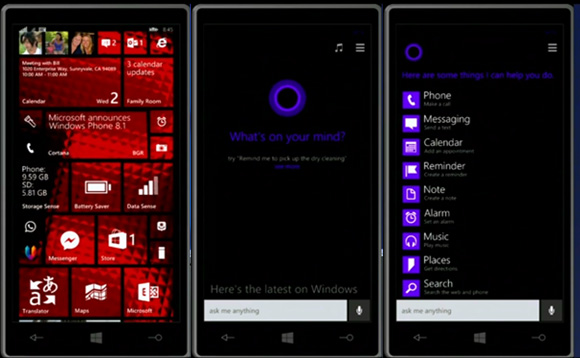
  • Windows Phone 8.1 brings its own virtual personal assistant called Cortana. With Android having Google Now and Apple boasting Siri, it was about time Microsoft also joined the native personal assistant to Windows Phone.
  • The Bing-powered Cortana plays an important role in WP 8.1 letting you set reminders, calendar events, call people, give you information about places you have or plan to visit. She also knows sports, gives weather info and basically everything you would expect from a virtual assistant. She’s going to be accessible through the Search key and features advanced voice recognition. This allows you to ask Cortana to search the web as well.
  • Cortana is also able to feed you custom notifications based on your personal information and usage data, should you allow it, much like Google Now. At launch, Bing and Foursquare are going to be feeding Cortana with information for places and events, but more online services will follow soon.
  • Joe Belfiore confirmed Cortana will be available in the US at first with the UK and China second. Other countries will follow later on.


Action Center

  • Windows Phone 8.1 finally gets a dedicated notification center called Action Center. It holds customizable quick setting toggles, which include brightness adjustment, location settings, rotation locks, Wi-Fi and Bluetooth on and off among others. Below that you get a notification drawer with a full list of ongoing notifications such as email, text messages, missed calls and even notifications from Cortana.


Updated lockscreen and custom tile backgrounds

  • Thanks to new open APIs, Windows Phone 8.1 allows applications to take control over the lockscreen and change the theme or alter its functionality altogether.
  • Joe Belfiore demonstrated a bunch of cool lockscreens, which displayed custom calendar entries with nice designs.
  • The other great customization feature is the option to set up custom backgrounds for the Start screen tiles. Small, but totally needed feature to make Windows Phone truly personal.
  • Another UI change means that you will now be able to select whether to have a third live tile column on the Start screen. Previously, this was set only by the phone manufacturer, so it's cool Microsoft lets the user make this decision in WP 8.1.


Internet Explorer 11

  • Windows Phone 8.1 ships with the latest version of Internet Explorer. IE 11 brings reading view, which grabs websites and extracts their text for easier reading. It also comes with a tuned up password manager, which will sync your passwords across multiple devices.
  • There’s also an InPrivate mode enabling incognito browsing. It doesn’t make you invisible on the web, but rather disable history storing and cookie information is deleted once an incognito tab is closed.
  • Users are now able to upload files through IE 11, with the browser also supporting WebGL and YouTube’s HTML5 video player.
Enterprise and security

  • The latest instalment of Windows Phone comes with VPN support. Now, you can punch in your VPN settings into the phone and surf the way more securely. WP 8.1 also supports S/MIME, which allows you sign and encrypt your email.
  • Sense apps
  • Microsoft hasn’t forgotten about its Sense apps and has added a few cool features to them. Battery Power Sense is the familiar app that tracks what software uses the phone’s resources most and gives you a handy overview of how your phone’s battery gets drained. Naturally, you can do something about it thanks to the Battery Saver option, which has app exclusion list.
  • Data and Wi-Fi Sense will give you greater control over how you use your network. Wi-Fi Sense is a cool new addition that gives you the ability to share the internet connectivity of your secured Wi-Fi networks with your Skype, Facebook and Outlook contacts without having to give the password. It also allows you to find and connect to free open Wi-Fi networks automatically.
On-screen keys

  • Just as a couple leaked screenshots suggested earlier, Windows Phone 8.1 now features on-screen software keys – Search, Start and Back. This means the requirement for hardware keys below the screen is a thing of the past
Quiet hours

  • Now in Windows Phone 8.1 you can set any period of the day when you want only a certain group of people to be able to reach you. This feature is called Quiet hours and is accessible from the Settings.
Wordflow Keyboard

  • A new option in the Windows Phone 8.1 keyboard is called Wordflow - a Swype-like input method allowing you to quickly input words by swiping through the letters. Joe Belfiore says it's so good that in fact it has set the new Guinness World Record for fastest writing on a smartphone, dethroning the Galaxy S4.
Availability

  • The Windows Phone 8.1 update will be officially released in a few months (that's as specific as Microsoft got), while new devices running it will start shipping in late April/early May. It's not specified which WP8 handsets will be treated to the update at this point, but we guess the list will be quite extensive.
  • And if you are registered Microsoft developer, you will be able to get an early glimpse on the update as early as April 10.

New Nokias


Nokia announced three new Lumia smartphones for Windows Phone 8.1, including the flagship Lumia 930, cheaper-though-still-4G Lumia 635 and the first dual-SIM Lumia - the 630, which also comes in a single SIM version, too.
  • Both the 630 and 635 feature 4.5-inch LCD displays, 1830mAh batteries, and 1.2GHz quad-core Snapdragon 400 processors.
  • The 930 has a 5-inch, 441 ppi Full HD display and a 20MP PureView camera. It runs on a 2.2GHz quad-coare Snapdragon 800 processor, has 32GB of internal storage and 2GB of RAM.

Monday, December 9, 2013

Microsoft Explains why they removed the Start Button on Windows 8

The start button on a Windows OS has been a fixed thing since the 1980s, but users got a shock when the saw no Start Button on Windows 8, but they got back the start button but not in the traditional sense.


Here's what Chaitanya Sareen of Microsoft had to say about all of this fiasco

With a host of samples collected from the Customer Experience Improvement Program, statistics painted an interesting picture that showed that the Start button usage was dwindling, representing a perfect time for Microsoft to explore other options that will allow them to "unlock a whole new set of scenarios". One of the other factors which led to this decision is the trending data that points to users opting to invoke applications and programs through the use of keyboard shortcuts, rather than wanting to take the time to navigate through the Start menu options and find what they want.

Tuesday, October 1, 2013

Bill Gates Admits CTRL+ALT+DEL was a mistake

In an interview at a Harvard fundraising campaign, Microsoft's Co-founder Bill Gates was quoted saying that making users to login from "Control+ Alternate+ Delete" was a mistake


Bill Gates explained "the key combination is designed to prevent other apps from faking the login prompt and stealing a password", "It was a mistake,". "We could have had a single button, but the guy who did the IBM keyboard design didn't wanna give us our single button."

Windows users might know and still use this famous combination to lock, or open the Task Manager window still in Windows 8

Tuesday, September 24, 2013

Microsoft Buys Nokia

Microsoft has gone out and bought the Nokia's division that made mobiles. This has to be the biggest tech news of the year!!.

The question stands what will happen to Nokia now, will Windows Phone be only seen on Nokia now???. For that we have to wait and watch.

Nokia's shares have been declining since iOS and Android was launched and Nokia had to still go with Symbian Series


RIP my favorite Mobile company


Monday, August 26, 2013

Steve Balmer to retire

Microsoft's CEO Steve Balmer is reportedly going to retire in the coming 12 months, and here is the leaked email he sent to Microsoft's employees

I am writing to let you know that I will retire as CEO of Microsoft within the next 12 months, after a successor is chosen. There is never a perfect time for this type of transition, but now is the right time. My original thoughts on timing would have had my retirement happen in the middle of our transformation to a devices and services company focused on empowering customers in the activities they value most. We need a CEO who will be here longer term for this new direction. You can read the press release on Microsoft News Center.
This is a time of important transformation for Microsoft. Our new Senior Leadership team is amazing. The strategy we have generated is first class. Our new organization, which is centered on functions and engineering areas, is right for the opportunities and challenges ahead.
Microsoft is an amazing place. I love this company. I love the way we helped invent and popularize computing and the PC. I love the bigness and boldness of our bets. I love our people and their talent and our willingness to accept and embrace their range of capabilities, including their quirks. I love the way we embrace and work with other companies to change the world and succeed together. I love the breadth and diversity of our customers, from consumer to enterprise, across industries, countries, and people of all backgrounds and age groups.
I am proud of what we have achieved. We have grown from $7.5 million to nearly $78 billion since I joined Microsoft, and we have grown from employing just over 30 people to almost 100,000. I feel good about playing a role in that success and having committed 100 percent emotionally all the way. We have more than 1 billion users and earn a great profit for our shareholders. We have delivered more profit and cash return to shareholders than virtually any other company in history.
I am excited by our mission of empowering the world and believe in our future success. I cherish my Microsoft ownership, and look forward to continuing as one of Microsoft’s largest owners.
This is an emotional and difficult thing for me to do. I take this step in the best interests of the company I love; it is the thing outside of my family and closest friends that matters to me most.
Microsoft has all its best days ahead. Know you are part of the best team in the industry and have the right technology assets. We cannot and will not miss a beat in these transitions. I am focused and driving hard and know I can count on all of you to do the same. Let’s do ourselves proud.


 Email courtesy:PC world

Tuesday, June 18, 2013

E3 2013-Part2- Microsoft- Xbox one

Every year Gaming and entertainment enthusiasts come along in Los Angeles, to celebrate the common love of entertainment. This year was a little special.
Here is my roundup of what happened this year in E3

Xbox One

  • It will launch in November 2012
  • People buying on first day will get limited edition
  • ability to record and upload game videos
  • Can change Xbox points to real money
  • Xbox 360 for people who cant be online all the time
  • Xbox one has to be online all the time(big power bills eh!!)
  • Windows 8 like Powerglass redesign


Friday, February 15, 2013

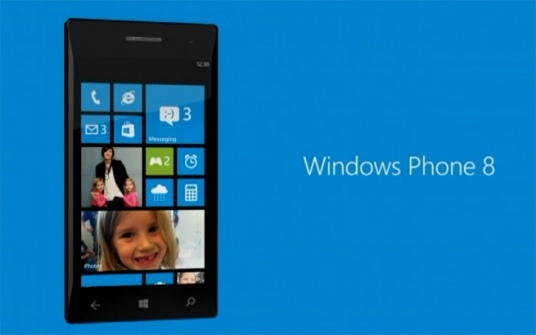
Microsoft Planning a Windows 8 Phone

According to a report Microsoft is planning to make a Windows 8 Mobile device that may be best in the market!!


Monday, July 30, 2012

Nokia's Meltemi OS gets axed


Nokia has apparently abandoned the Meltemi OS which was supposed to be launched in budget smartphones and they have planned to stick to the Series 40 platform for their Asha Series


Tuesday, July 10, 2012

Micosoft's Launches on E3

Microsoft had some interesting launches

  • SmartGlass:It was designed to let users play all kinds of media coming from mobile devices like phones and tablets (and Windows computers) on their TVs, via the Xbox 360. 
  • FIFA 13 with kinect
  • Fable
  • Voice recognition on Xbox
  • Sports on Xbox
  • Xbox Music
  • Nike + Training on Xbox
  • Internet Explorer on Xbox

Tuesday, June 19, 2012

Microsoft's Surface Tablet/Laptop Hybrid

Microsoft yesterday unveiled a tablet/laptop hybrid they called the "Microsoft Surface Tablet". The hybrid supports a 10.6 inches. Although the prices are unknown what is known that the hybrid will come with different types of processors ranging from i5-ARM processors.  

ARM
The ARM one will have Windows RT which is a version of Win 8 on which only Metro Apps will work and it will be 9.3mm thin!!, will weigh 676 grams.It will also run a full suite of MS Office. It will also have 2 Full USB Ports

CORE
The core processor tablet will have higher resolution screen, will support all apps, including the one on full computers, bigger battery, USB 3.0 ports, Windows 8 Professional. It will be 13.5mm thick and will weigh 903 grams.

BOTH
Both the tablets will have a magnesium case and will be called a "Vapor Mg" case. Both will have
an inbuilt kickstand that will allow it to put the tablet vertically for comfortable video viewing.
Microsoft has also like Apple has made a special covers for its tablet. One has a touch keyboard and other has a physical keyboard.


Blogger Templates