Social Icons

Showing posts with label Part 5. Show all posts

Tuesday, June 10, 2014

WWDC 2014 Full Rundown-Part 4

Here's the full rundown from the Apple's WWDC which was held on  2/6/2014

iCloud

  • 300 million users of iTunes are now on the cloud

iWork

  • iWork now is on the iCloud 
  • Pages, Numbers, Keynote all will be running on the browser
  • Looks identical to the desktop versions
  • Drag and drop to edit Office Docs
  • Can do 3D keynote animations in the browser
  • Support on Safari, IE, and Chrome too
  • Available today as a developer beta. All users later in the year.

OSX YOSEMITE

  • Can recieve phone calls now
  • Can recieve messages now too
  • Start work on iOS device complete it on a mac
  • iOS 7 look to mac now
  • Also will launch in Fall
  • Will be free

Monday, June 9, 2014

15 Tips To Extend Your Windows Based Tablet's or Laptop's Battery Life-Part 5

We use laptops and tablets all the time in our daily life, and its a bummer when the batteries die out when we are working. Here are some tips to save battery life for your Windows based tablets and laptops.


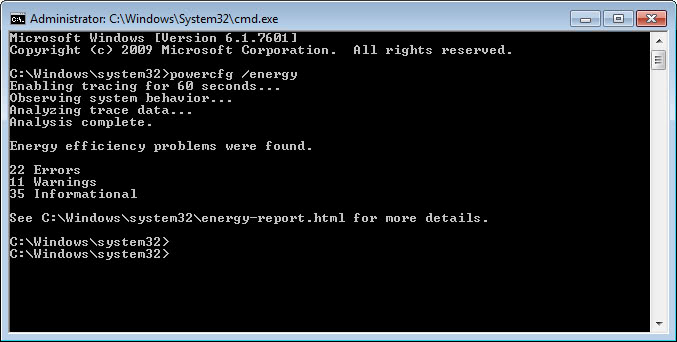
  • Get Power Efficiency Report-To get a power efficiency report: Click Start, type CMD, right click cmd.exe and click Run as Administrator.On the command line, type powercfg -energy to view a power efficiency report.


  • Wednesday, June 4, 2014

    15 Tips To Extend Your Windows Based Tablet's or Laptop's Battery Life-Part 4

    We use laptops and tablets all the time in our daily life, and its a bummer when the batteries die out when we are working. Here are some tips to save battery life for your Windows based tablets and laptops.


    • Ventilate your laptop- Keep your laptop's ventilation a top piority,use it keeping on a sturdy, flat clean surface

    • Close the lid when you are listening to music- Doing this will save a little battery

    • Disable Updates for softwares
    • Remove cd's usb, etc when not in use


    Monday, June 2, 2014

    15 Tips To Extend Your Windows Based Tablet's or Laptop's Battery Life-Part 3

    We use laptops and tablets all the time in our daily life, and its a bummer when the batteries die out when we are working. Here are some tips to save battery life for your Windows based tablets and laptops.


    • Make the laptop's screen dim and sleep's timer faster

    • Lower the Visual Effects- To do this click on control panel and type visual in the search box, then click on Adjust the appearence, then click on adjust for best performance

    • Turn off aero-Right click on desktop and click personalization, then to window colour then uncheck Enable Transparency

    • Disable Search indexing-Click the Start button, then click Control Panel, and type index in the top-right search box. Click Change how Windows searches. Uncheck all, then click ok

    Thursday, May 29, 2014

    15 Tips To Extend Your Windows Based Tablet's or Laptop's Battery Life-Part 2

    We use laptops and tablets all the time in our daily life, and its a bummer when the batteries die out when we are working. Here are some tips to save battery life for your Windows based tablets and laptops.


    • Disable Wifi and Bluetooth- Disable wifi and bluetooth when not in use, this will not only save your laptop from getting hacked but also save your battery. To see how to turn them off see your laptop's instruction manual.

    • Disable ScreenSaver- Screensavers use CPU which in turn use your battery. To turn off screensaver right click on desktop, then click on personalise, click screensaver and then click on to none.

    • Change power options- Change your laptop's power options to Power Saver. To do this click on the battery icon and then change the mode to Power Saver


    15 Tips To Extend Your Windows Based Tablet's or Laptop's Battery Life-Part 1

    We use laptops and tablets all the time in our daily life, and its a bummer when the batteries die out when we are working. Here are some tips to save battery life for your Windows based tablets and laptops.


    • Turn the screen brightness down-Turn it down to the lowest you can get to.
    • Use-less apps(Pun-intended)- Use lesser apps to multitask

    • Disable windows sidebar gadgets- The windows gadgets use up a lot of battery power

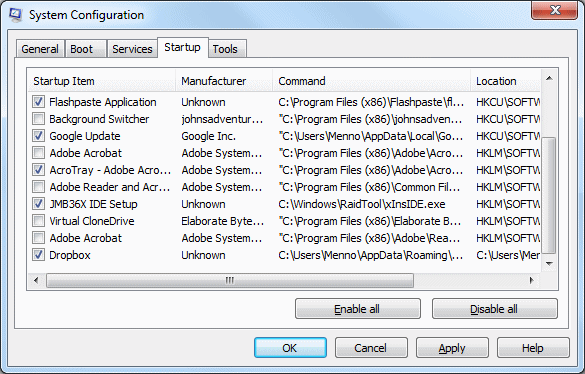
    • Disable startup applications- The apps that load whenever you boot takes too much of RAM and battery power. To disable them run "msconfig" and then click on startup and then click on disable all


    Wednesday, May 14, 2014

    10 Changes in Call of Duty Game:Advanced Warfare-Part 5

    After details of the next Call of Duty were leaked online ahead of the game's intended official reveal, Activision has now announced that this years Call of Duty will be called Call of Duty: Advanced Warfare.
    Call of Duty: Advanced Warfare's release date is set for 4 November 2014, and here's what's changed

    9. DRONES
    Another addition is that of new drones. Although drones have appeared in the franchise before, Advanced Warfare seems to place considerable emphasis on unmanned vehicles. We saw groups of them being deployed in what looks like a singleplayer portion of the game, but there’s one sequence when a soldier tosses a turret drone into the air. That moment looks a lot more like something we’d see in multiplayer. Who doesn’t want a little buddy following them around that would fill enemies full of lead? No one that’s who.

    10.SPIDER TANKS

    Not only did we see hoverbikes in the trailer, but there was also a scene that showed a spider tank terrorizing anyone that got near it. Again, we don’t know if this would show up in multiplayer, but having a speedy hover bike go up against a slow but powerful tank sounds like something we’d like to experience online.

    10 Changes in Call of Duty Game:Advanced Warfare-Part 4

    After details of the next Call of Duty were leaked online ahead of the game's intended official reveal, Activision has now announced that this years Call of Duty will be called Call of Duty: Advanced Warfare.
    Call of Duty: Advanced Warfare's release date is set for 4 November 2014, and here's what's changed

    7.DEPLOYABLE COVER
    Now that you or a teammate can throw down cover almost anywhere, we’re guessing this will be essential to your survival on a hectic battlefield. Imagine a game of capture the flag with a few defenders using this ability. It’s going to make it a whole lot harder to score a point when your opponent is effectively using their cover to defend their flag, or having set up a nice little sniper spot for themselves.

    8.HOVER BIKES

    Getting from point a) to point b) never looked so good. Not only do these bikes look fast, but they also look deadly when hurdling a barrage of bullets at anyone in the way. We haven’t seen mannable vehicles in Call of Duty multiplayer since World at War, so we’d be surprised to see hoverbikes made available to player online. Still, any big change to the series is a welcomed one in our book.

    Tuesday, May 13, 2014

    10 Changes in Call of Duty Game:Advanced Warfare-Part 3

    After details of the next Call of Duty were leaked online ahead of the game's intended official reveal, Activision has now announced that this years Call of Duty will be called Call of Duty: Advanced Warfare.
    Call of Duty: Advanced Warfare's release date is set for 4 November 2014, and here's what's changed

    5.INFRARED GRENADES
    Now, this is a big departure from everything we know about infrared in games. We can only assume that a grenade will have a limited area of effect and last only briefly, but a player that can see through walls in a highly trafficked area is going to be a force to be reckoned with in multiplayer.

    6.LIGHTNET

    This power was a little more ambiguous, but it appears as if it detects enemy movement, or at the very least, scans the terrain. While the exact benefits are unknown, it could be used to detect mines or equipment in an environment. We have more questions than answers for this one, but the blue light has us speculating and intrigued by it’s possible functions.

    10 Changes in Call of Duty Game:Advanced Warfare-Part 2

    After details of the next Call of Duty were leaked online ahead of the game's intended official reveal, Activision has now announced that this years Call of Duty will be called Call of Duty: Advanced Warfare.
    Call of Duty: Advanced Warfare's release date is set for 4 November 2014, and here's what's changed

    3 THE MECH SUIT

    You’re already going to be in an exo suit, so what could the designers give you to one up another player? How about a mech suit with a gattling gun? We obviously don’t know if this will be in multiplayer, but it immediately made us think of the Last Titan Standing gametype in Titanfall. Or, perhaps Sledgehammer Games plans to use this bulked up mech as some form of juggernaut perk for multiplayer.

    4.INVISIBILITY


    Camouflage that makes you invisible is hardly novel for the first-person shooter genre, but this is the first time that Call of Duty has gone far enough into the future for us to see it in-game. We’re not sure if it’ll be a perk or some other form of unlockable bonus, but we’re definitely interested in the possibilities.

    Monday, May 12, 2014

    10 Changes in Call of Duty Game:Advanced Warfare-Part 1

    After details of the next Call of Duty were leaked online ahead of the game's intended official reveal, Activision has now announced that this years Call of Duty will be called Call of Duty: Advanced Warfare.
    Call of Duty: Advanced Warfare's release date is set for 4 November 2014, and here's what's changed

    1.EXO SUIT


    The first thing you see in the trailer is an exo suit and it’s likely going to be a huge part of gameplay, both in terms of combat and mobility. Its basic function gives the player enhanced strength and the ability to jump extreme distances. Will you be able to do melee attacks from afar? Will we be able to re-create the freeway scene from The Matrix? We’re excited to discover the answer.

    2.WALL CLIMBING

    It’s not quite the wall running we’ve become accustomed to in Titanfall, but wall climbing is definitely going to change traversal as we know it in the Call of Duty series. It also gives the game designers a chance to add verticality to map design — something we’ve rarely seen from the franchise. However, this does have us wondering if wall hanging will also be a feature. Let’s try not to imagine what campers would do with that kind of power.

    Wednesday, March 26, 2014

    A Glimpse Of the Future-Part 5

    Let me take you into a not so distant future!!

    SMART HOMES
    While you are watching movies the house's light turn down and turns into "Movie mode". This means the only call you will get will be which are most important. The whole room turns into a movie theater. The front wall turns into the screen and the other walls turn into speakers giving realistic sound

    OTHERS
    While you are going to your bed. Your devices are charging simultaneously and will disconnect when they are done.

    When you are sleeping the neighborhood police car is passing by, the home detecting there is no danger gives an all clear sign to the police's car


    A Glimpse Of the Future-Part 4

    Let me take you into a not so distant future!!

    GAMING
    While you are starting to have food, the kids have transferred the game from their console which was connected to their tv to their phones, and are still playing. Games which use to be platform dependent are all things of the past

    RFID
    After the dinner is done you sit down to watch some tv, but alas the remote cannot be found!. But thanks to the intelligent devices you can track down the remote via your home computer. The remote has an RFID chip build in. The remote starts buzzing and you track the remote.
    After the movie is done, you lock down your home from the inside via a fingerprint scanner into your home computer.


    Tuesday, March 25, 2014

    A Glimpse Of the Future-Part 3

    Let me take you into a not so distant future!!

    GLOBAL POSITIONING

    using special positioning system you wife can track down where you are and when you are nearby,and she starts preparing the food,along watching the television. She sends a message to the kids playing games in another room for the food and the countdown till the food will be served starts prompting on their screens


    INTELLIGENT DEVICES
    Your wife orders the tv via voice command to save the recording of the recipe, also the fridge which is connected to the internet prompts you that the following foods will perish soon,and finds recipes which will use the foods


    A Glimpse Of the Future-Part 2

    Let me take you into a not so distant future!!

    COMMUNICATION

    After you are done shopping, you get a call from your wife on your smartwatch, after you nod to a yes, the call is automatically beamed to you smartglass. She asks you that if you have bought everything she needed. And she also tells you to look for a good tuition center for your kid


    PHOTOGRAPHY

    While you are waiting for a red light to go green you come across a tuition ad. You click a button on the left side of the specs and the photo is automatically transfered to your smartwatch. With the phone no. and the address waiting for you to save on your address book


    Monday, March 24, 2014

    A Glimpse Of the Future-Part 1

    Let me take you into a not so distant future!!

    CARS

    You are in your car you receive a message onto your phone from your wife, the car's AI system reads it aloud for you after detecting that there is no one in the car except you. You wife tells you to bring some groceries from the store.

    Your car's AI system detects words BUY, SUGAR, GROCERIES, and charts a route to the nearest and cheapest supermarket, where all the items you need are available


    PAYMENT


     After you have picked everything you need. Your total is beamed upto your smartwatch, after the smartwatch detects that is the person wearing the watch is you- the watch asks if you want to transfer the money to the supermarket. After you nod to a yes, the money is transferred to the market's account safely, securely, and wirelessly


    Saturday, March 1, 2014

    10 Must Play Android Games-Part 2

    Here is my list of favorite Android Games that you must play!!


    • FIFA 14-Another console like game 


    Blogger Templates