We use laptops and tablets all the time in our daily life, and its a bummer when the batteries die out when we are working. Here are some tips to save battery life for your Windows based tablets and laptops.
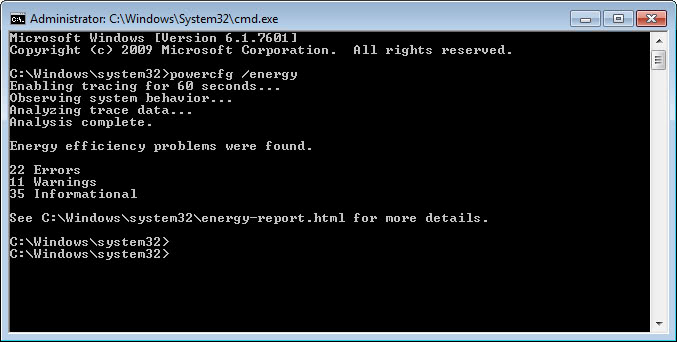
Get Power Efficiency Report-To get a power efficiency report: Click Start, type CMD, right click cmd.exe and click Run as Administrator.On the command line, type powercfg -energy to view a power efficiency report.
Showing posts with label battery. Show all posts
Monday, June 9, 2014
Wednesday, June 4, 2014
15 Tips To Extend Your Windows Based Tablet's or Laptop's Battery Life-Part 4
We use laptops and tablets all the time in our daily life, and its a bummer when the batteries die out when we are working. Here are some tips to save battery life for your Windows based tablets and laptops.
- Ventilate your laptop- Keep your laptop's ventilation a top piority,use it keeping on a sturdy, flat clean surface
Monday, June 2, 2014
15 Tips To Extend Your Windows Based Tablet's or Laptop's Battery Life-Part 3
We use laptops and tablets all the time in our daily life, and its a bummer when the batteries die out when we are working. Here are some tips to save battery life for your Windows based tablets and laptops.
- Make the laptop's screen dim and sleep's timer faster
- Lower the Visual Effects- To do this click on control panel and type visual in the search box, then click on Adjust the appearence, then click on adjust for best performance
- Turn off aero-Right click on desktop and click personalization, then to window colour then uncheck Enable Transparency
Thursday, May 29, 2014
15 Tips To Extend Your Windows Based Tablet's or Laptop's Battery Life-Part 2
We use laptops and tablets all the time in our daily life, and its a bummer when the batteries die out when we are working. Here are some tips to save battery life for your Windows based tablets and laptops.
- Disable Wifi and Bluetooth- Disable wifi and bluetooth when not in use, this will not only save your laptop from getting hacked but also save your battery. To see how to turn them off see your laptop's instruction manual.
- Disable ScreenSaver- Screensavers use CPU which in turn use your battery. To turn off screensaver right click on desktop, then click on personalise, click screensaver and then click on to none.
- Change power options- Change your laptop's power options to Power Saver. To do this click on the battery icon and then change the mode to Power Saver
15 Tips To Extend Your Windows Based Tablet's or Laptop's Battery Life-Part 1
We use laptops and tablets all the time in our daily life, and its a bummer when the batteries die out when we are working. Here are some tips to save battery life for your Windows based tablets and laptops.
- Turn the screen brightness down-Turn it down to the lowest you can get to.
- Use-less apps(Pun-intended)- Use lesser apps to multitask
- Disable windows sidebar gadgets- The windows gadgets use up a lot of battery power
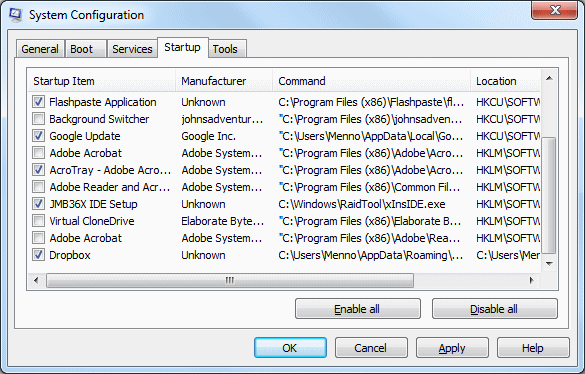
- Disable startup applications- The apps that load whenever you boot takes too much of RAM and battery power. To disable them run "msconfig" and then click on startup and then click on disable all
Tuesday, October 15, 2013
How to know its time to change the Battery of your Laptop
Has your laptop giving you a tough time to work on??
Here are some sure shot tips to see if your battery has to be replaced
- Time It- My laptop is almost 4 yrs old, brilliant laptop BTW, but the work time on it is almost 15-20 minutes, if you do not know how much time does it take you to work on your laptop time it. If it is below 30 mins change the battery
- Age- If your laptop works all day around chances are it's aged a lot
Monday, May 27, 2013
Check You Battery % Correctly-Android
Now a days the phones are getting smarter and the batteries are huffing and puffing to catch up. So you need to keep an eye on the battery meter
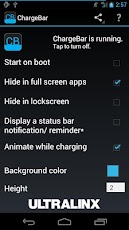
ChargeBar is a highly-customizable, completely-free MIUI battery bar application for ANY Android device on ANY ROM, with or without root! Just pick a color (or set of colors), position, height and go! What makes ChargeBar unique? ChargeBar is the only MIUI battery bar application that can accurately automatically hide in fullscreen apps (great for those who want to have ChargeBar be translucent and overlay their status bar), and it is the only MIUI battery bar application that lets YOU set what colors you want to display when. No predefined ranges means that you are 100% in control!
Wednesday, March 20, 2013
Friday, August 17, 2012
Save battery of your laptop running on Windows 7
Here are some simple tips to save your laptop's battery when running Windows 7
1.Disable Aero-Aero in W7 eats a lot of your battery life. Here's how to disable it.
in the search bar type "Visual" click on the link that says "Adjust appearence...".
Click on that, click on "Adjust for best performance".
2.Turn on Wifi+Bluetooth when you need
3.Turn down screen brightness
4.Turn off ScreenSavers
1.Disable Aero-Aero in W7 eats a lot of your battery life. Here's how to disable it.
in the search bar type "Visual" click on the link that says "Adjust appearence...".
Click on that, click on "Adjust for best performance".
2.Turn on Wifi+Bluetooth when you need
3.Turn down screen brightness
4.Turn off ScreenSavers
Wednesday, July 25, 2012
Extend Battery Life of your Smartphone
Phone are getting extremely smart now a days but they are dumb phones when it comes to battery life here's how to extend your battery life
1.Turn off ScreenSaver& Wallpaper
2.Turn off vibrator
3.Avoid long ringtones
4.Turn on wifi& Bluetooth only when needed
5.Set automatic emails to manual
6.Close apps when not in use
1.Turn off ScreenSaver& Wallpaper
2.Turn off vibrator
3.Avoid long ringtones
4.Turn on wifi& Bluetooth only when needed
5.Set automatic emails to manual
6.Close apps when not in use
Subscribe to:
Posts
(
Atom
)