Social Icons

Showing posts with label How to. Show all posts

Monday, December 1, 2014

How to Convert Big Size Video to Small Size MKV- Part 2

11. Picture->Anamorhpic->Loose
 12. Video->Codec->H.264(x264), FPS->Same As Source->RF Encode Mode->26
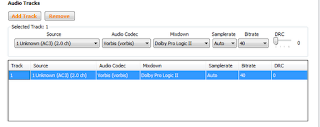
13. Audio->Remove(Twice), Add Track, Source->Automatic, Vorbis, Bitrate-40
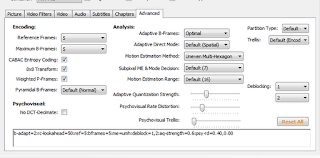
14. Advanced->Reference Frame-5,Max BFrames-5, Motion Estimation-Uneven….,Subpixel-7,Deblocking-1&2,Adaptive-0.6,Psycovisual-0.4
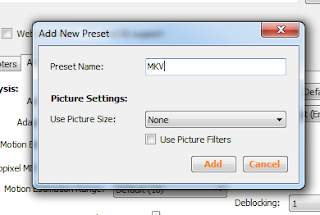
15. Add Preset and give a custom name
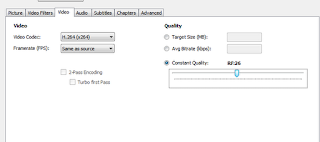
16. Click on the preset and click Start
17. It will take time to encode depending on your Computer speeds
18.Before-

19-After-

 

Wednesday, November 26, 2014

How to Convert Big Size Video to Small Size MKV- Part 1

I am now going to tell you how to How to Convert Big Size Video to Small Size MKV

1. Download Handbrake from here: https://build.handbrake.fr/job/Windows/
2. Choose your 32 or 64 Bit Config
3. Download
4. Install
5. You will be presented with this:
6. Tools->Options->Browse(Choose Folder in Which the file will be kept after encoding)

 7. CLI->Start Window Minimized, Priority Level->Low
 
8. Advanced->Enable GUI, Show CLI Video->Uncheck


 9. Select High Profile, Container MKV


10. Pick The Source video in this case it is 2.08 GB of a Movie

Thursday, October 16, 2014

What to look when you want to buy a LCD Monitor/LCD TV

Response Time-It is the amount of time it takes for a pixel to change its colour. 16ms is a very good response time.

Contrast Ratio-The ratio between the blackest black and the whitest white. The higher the better.

Viewing Angle-The maximum viewing angle you can get.

Ports- Must have a HDMI cable, so that you can attach a BlueRay player, a console


How To solve the"Windows-Delayed Write Failed"Error

The delayed write error could be a sign of failing hard drive. But do not get tensed try these tips to see if you need to replace your hard drive or not

1.Backup your hard drive data As Soon As Possible!!!
2.Open your computer CPU and see if your hard drive's cable is loose or not
3.If you notice that your cable's damaged you'll have to replace them
4.Do a format of your Hard Drive see if that works!
5.Even if these steps do not work, then you may have to buy a new hard drive


Tuesday, October 14, 2014

How to take car(d)e of your Memory Cards

1.Minimize the number of times you access the card.
2.If you are getting problems in using your card format it! Do not do it a lot of times
3.When you are using it on a computer always, always safetly remove it
4.Do not "hot Swap" your memory card
Hot swapping is removing and inserting another card while the phone is in use, even your phone supports this
5.Keep a backup of your card
6.Keep a backup card in case your memory card gives up
7.Keep backing up your memory cards once a while


How To download from Torrents

A Torrent is a file that contains a URL of a large file on the P2P network and you can download anything ranging from Games, Movies, Softwares, OS'es from it


P.S. You must remember that most of the files on Torrents are illegal and the owner of this blog, nor this blog supports downloading these files

  1. Download a Torrent client- There are a lot of Torrent client softwares but the best is uTorrent
  2. Install the software
  3. Go to a torrent finder website- There a lot of Torrent finder websites but the one of the best is this
  4. Finding a suitable torrent file- The file you are looking for should have a lot of peers(people who are downloading now) and leechers(who are uploading the file now)
  5. Download the .torrent file and open it via the software
  6. Let it download
  7. Open and Enjoy!!

Monday, October 13, 2014

How to make your computer's boot up fast

1.Run> Msconfig>Enter> Uncheck any thing you dont want to boot at the startup
2.Update your Windows and your Anti-Virus
3.Defrag your computer atleast twice a week
4.Uninstall all the games, software you do not use


Thursday, July 24, 2014

How to solve the BLUE SCREEN OF DEATH

Sounds scary?? well it quite is and I tell you how to solve it

Why it happens?

It happens when the computer has a hardware or driver problem

How to solve it?


1.Start Windows in Safe Mode
2.Think what went wrong what were you doing before it went kaput
3.Scan Windows for viruses
4.Update windows and drivers
5.If there still is a problem-Reinstall windows and install all your drivers
6.If problem still persists get your hardware checked and fixed

Wednesday, April 30, 2014

How To Install WhatsApp On iPad And iPod touch Without Jailbreak

There is a way of getting WhatsApp to become fully functional on both Apple’s tablet, the iPad, and their iPod touch range. The best thing about this, is that no jailbreak is required. You simply need a computer, and brief access to an iPhone for the activation part of the setup.

WhatsApp is fully functional on iPad as well. It follows the exact same process, so you shouldn’t have any issues. I also used a Mac throughout this tutorial, but a Windows PC will work just as well. I’ve outlined the few differences below.

There are a only few minor differences between the process depending if you’re on a Mac or PC:


  • You’ll need to download the specific version of iFunBox for your operating system. Either Mac, or PC. You can download it from: i-funbox.com
  • On your Mac, the file directory to find the WhatsApp ipa is as follows: ~/Music/iTunes/iTunes Media/Mobile Applications/
  • Whereas on Windows, the file directory to find the WhatsApp ipa is: C:\Users\Username\My Music\iTunes\iTunes Media\Mobile Applications\


Here’s how you can Cortana on your Device


  • In the System App go to “Region"
  • Then select Country to United States


  • Leave the region format to “Match Phone Language”
  • The app will ask for a reboot, do that
  • When your phone has re-started
  • Go again into Systemàtap LanguageàAdd LanguageàEnglish(United States)
  • Then long press and make it the default language
  • Then go into the application settings you can now use Cortana
  •  To quickly acess Cortana press the Search button


  • Tuesday, April 29, 2014

    How to get Windows Phone 8.1-Part 2

    • The first update will be a 50MB update that and after updating  will restart your device
    • Now go into the Phone Update again, you will be prompted for the update again install this too-This will be an approx 500 MB update, it can take a little time depending on your internet speed
    • After the phone has updated and restarted will be on Windows Phone 8.1
    • But if you notice there will be no Cortana- Microsoft’s answer to Apple’s Siri See here for the next tutorial

    How to get Windows Phone 8.1-Part 1

    Microsoft’s Windows Phone got a very exiting and feature rich update last month which was named the “Windows Phone 8.1”,and Microsoft isn't launching Windows Phone 8.1 until sometime this summer but you can get hold of preview if you like. Here's how to download and install the Windows Phone 8.1 developer preview.
    Normally registering as a developer to get early access to software is tricky and can cost money. However, there is a fairly easy way of registering with Microsoft for free in order to get your hands. Also keep in mind that, before you follow these steps to get Windows Phone 8.1, be aware that it will void your warranty until the update  has officially rolled out the software. Updates will only include the Microsoft update, not additional OEM drivers/firmware. You can't revert to a prior OS version once you have taken an update via the developer program. However, you opt-out of pre-releases to then only receive production Windows Phone updates.

    So now lets get started with the steps to update your WP Device

    • Go to the Windows Phone App Studio on your Computer, and sign in with the same id that you use to login to your WP Device The URL is-http://appstudio.windowsphone.com/Projects
    • When you are registered open the Store in your Windows Device and search the following app “Preview For Developers” also you can scan this QR Code with your device

    • When the app is installed, sign in again with your id, and keep clicking on next, and yes till the app says Success!
    • Now with that done- Open the Settings AppàGo to Phone Update, and then you will be notified of an Update
    • Also keep in mind that you must have atleast 80% of battery in your device, or else it can brick your device, Also uncheck Battery Saver option if checked

    Thursday, April 24, 2014

    How To Project Windows Phone 8.1 Display To Your PC

    If you have updated your phone to 8.1 then you might notice a Display My Screen Setting and here's how you can activate and use it


    • Download Project My Screen from here
    • Update WP to 8.1
    • Connect your Device to pc
    • Turn on PMC on Phone
    • Enjoy

    Tuesday, April 15, 2014

    Clean your monitor or TV screen

    Even if you don't have snot-nosed kids or wet-nosed pets, your computer monitor or HDTV panel will eventually accumulate a collection of annoying smudges and stains. My household happens to contain both of the aforementioned creatures and, thus, I've developed a method for wiping down the HDTV in the living room and the LCD monitor in my office, as well as the screen of my laptop and iPad.

    If you take a quick survey of LCD or HDTV manufacturers about the recommended method for cleaning the surface of your monitor or TV screen, you'll discover more don'ts than dos, often in conflict with one another.

    In the don't column:

    Don't use aerosol sprays, solvents, or abrasives. (This means don't reach for the Windex under the kitchen sink, as tempting as it may be.)
    Don't use anything other than warm water.
    Don't use any liquid at all.
    Don't spray a liquid directly on the screen.
    Don't use a hard cloth.
    Don't use your fingernail or a sharp object to remove stubborn stains.
    In the do column:

    Use a dry, soft, lint-free cloth, preferably the micro-fiber cleaning cloth that may have come with your TV or monitor.
    Use a solution of mild soap and water, if needed.
    Taking all of the above advice into consideration and speaking from my own experience, the following is my recommendation:

    First, attempt to clean your screen with a dry, lint-free cloth. If you can't find the cleaning cloth that came with your screen in question, then it's likely you have one laying around from a laptop, iPad, or iPhone purchase.

    If a dry cloth doesn't remove the smudges and stains on your screen, then get yourself two cloths and a solution of diluted dish soap and warm water. (I use Dawn dish soap, and just a drop.)


    Wednesday, March 19, 2014

    How to Change the Default Language of Your Windows 7 PC

    The display language is the language that Windows uses in wizards, dialog boxes, menus, Help and Support topics, and other items in the user interface. Some display languages are installed by default, and others require you to install additional language files.
    When you change the display language, it is changed for your user account and is not changed on the Welcome screen. If you want to set the display language for multiple users or the Welcome screen, see Apply regional and language settings to reserved accounts.


    • Click the Start Button
    • Click on Control Panel


    •  Then click on "Clock, Language, and Region",


    • Then clicking Regional and Language Options.


    • Click the Keyboards and Languages tab.


    • Click on Change Keyboards
    • Choose the Language
    • If you cannot Choose Languages 
    • Then Click on "Add"

    Wednesday, March 12, 2014

    How To Set Time Problems in Dual/Triple Booting Computers

    Here's how you can fix incorrect time between 2 or 3 OSes


    • Change time in Windows to the region
    • Change time to Mac osx too
    • If it works then great if it doesn't then do this


    1. Win+R
    2. Type "regedit.exe"
    3. Navigate to HKEY_LOCAL_MACHINE\SYSTEM\CurrentControlSet\Control\TimeZoneInformation. 
    4. Right click anywhere in the right pane and hit 
    5. New > DWORD (32-bit) Value. 
    6. Name it RealTimeIsUniversal, then double click on it and give it a value of 1
    7. Restart to Mac or Ubuntu
    8. Check time again

    Monday, March 3, 2014

    How to Convert Big Size Video to Small Size MKV-Part 2


    1. It will take time depending on the file and your computer's speed
    2.My file size after conversion was 130MB
    3. The un-converted's size was 160MB

    4. Almost no difference!!


    VIDEO VERSION


    Tuesday, February 25, 2014

    How to Convert Big Size Video to Small Size MKV-Part 1

    1.Download Handbrake from here

    2.Install Handbrake
    3.Import the file you want to convert
    4.Choose the destination folder
    5.Choose High Profile in the side bar
    6.Container-MKV
    7.Codec-H.264
    8.FPS-Same as Source
    9.RF Encode /mode -24
    10.Audio-Remove, then add, MP3, Bitrate 40
    11-Advanced- Refrence Frames-5, Max B Frames-5, Motion Estimation- Uneven....., Subpixel-7, Deblocking- 1&2, Adaptive-0.6, Psycovisual-0.4

    VIDEO VERSION


    Wednesday, February 19, 2014

    How to create a printable List of all your files

    Here's how you can create a printable List of all your files


    1. Open notepad
    2. Type the following code "dir(space)/s(space)*.*(space)>dirlist.txt "
    3. Save into the drive or folder you need to make a list of
    4. Check that Encoding is ANSI
    5. Save as "listing.bat"
    6. Open the listing.bat file
    7. Wait 2-3 seconds
    8. Your listing is ready....


    Blogger Templates