Social Icons

Showing posts with label podcast. Show all posts

Wednesday, March 12, 2014

How To Set Time Problems in Dual/Triple Booting Computers

Here's how you can fix incorrect time between 2 or 3 OSes


  • Change time in Windows to the region
  • Change time to Mac osx too
  • If it works then great if it doesn't then do this


  1. Win+R
  2. Type "regedit.exe"
  3. Navigate to HKEY_LOCAL_MACHINE\SYSTEM\CurrentControlSet\Control\TimeZoneInformation. 
  4. Right click anywhere in the right pane and hit 
  5. New > DWORD (32-bit) Value. 
  6. Name it RealTimeIsUniversal, then double click on it and give it a value of 1
  7. Restart to Mac or Ubuntu
  8. Check time again

Monday, February 17, 2014

How to triple Boot Computer- Part 6 - Setting Up Bootloader


This is part 6 of How to triple Boot Computer, and this time I am going to setup the Bootloader, which will help you to choose to boot any one os


  • Open Easy BCD

  • Install and then run it
  • Click on "Add new Entry"

  • Click on Mac-->Type any name, Mode--> MBR
  • Click on Add Entry
  • Restart your computer&Check all the OS'es
  • Enjoy your newly triple booted Computer


Video Version


Monday, February 10, 2014

How to triple Boot Computer-AIO Thread

How to triple Boot Computer- Part 5 - Ubuntu 12.10 Installation


This is part 5 of How to triple Boot Computer, and this time I am going to install Ubuntu 12.10


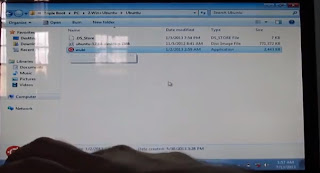
  • Open Wubi

  • The Ubuntu .iso file should be in the same folder
  • Choose the drive you want to install Ubuntu into

  • Input the username and password
  • Then click install

  • After the installation has been completed, then restart the pc

  • After it has restarted, boot to Ubuntu and let it set it up itself


  • Next, i am going to install a bootloader which will help to boot anyone of the os'es


Video Version

Monday, February 3, 2014

How to triple Boot Computer- Part 4 - Windows 7 Installation


This is part 4 of How to triple Boot Computer, and this time I am going to install Windows 7


  • Insert the Win 7 DVD
  • Let it boot from it

  • Wait till it loads to the following screen

  • Choose the language you want to install into i chose "English"
  • Click Next
  • Click on I Accept
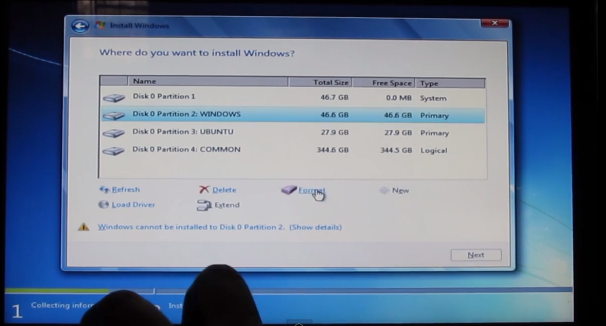
  • When choosing the installation drive
  • Click on the windows drive and format it


  • And click next
  • After a little time the installation will be sucessfull
  • You will reach the desktop

Video Version


Monday, January 6, 2014

Downloads- Triple Boot

How to triple Boot Computer- Part 1 - Intro


This is part 1 of how to triple boot your computer or pc. in this video i will introduce you the basics of the tutorial. I will be triple booting acer aspire 5745g the specs are
  • Operating system installed: Windows 7 Home Premium(64bit) 
  • Processor type: 2.26GHz Intel Core i5 Mobile Processor M430,Turbo Boost 2.53ghz. 3 MB L2 Cache, 1066 MHz FSB 
  • Memory: 4GB DDR3 RAM Supports upto 8GB RAM 
  • Hard Disk: 500GB HDD 
  • Optical drive:SuperMulti 8X DVD±R/RW with Double Layer Support 
  • Display size and resolution: 15.6-inch WXGA High-Definition WideScreen 1366×768
  • Graphics:Nvidia GT 330m 2 GB Dedicated Graphics Card 
  • Network: Ethernet Lan, Wireless LAN(b/g/n) 
  • Webcamera and Microphone: Webcam with Integrated Microphone 
  • Ports: 3 USB 2.0, 1 HDMI, 1 VGA,HDMI, 1 RJ-45, 1 Stereo headphone-out, 1 Microphone in
  • Speakers: Dolby Stereo Speaker 
  • Battery and Power Charger: 6 cell Battery ( approx 3.0 hours backup)


To see if your hardware is compatible or not please check on Google

I will be installing mac osx snow leopard, windows 7, and ubuntu 12.10. First you will have to download the iso file of the os'es links here. After downloading them, burn them up into a dvd, except the ubuntu.

You will need to do some changes in you bios-
Go to your bios and change graphics to discrete.


Video Version


Thursday, September 5, 2013

How to triple Boot Computer- Part 3- Mac's Drivers


This is part 3 of how to triple boot your computer or pc. I will install Mac's Drivers onto the laptop now

Here are the steps
  • Download the kexts from here
  • Install VoodooHDA 2.7.2
  • Keep clicking next till you reach password and input password then
  • Open Kext Helper B7
  • Drag Atheros into the Kext Helper B7


  • After the installation finishes, Restart the Laptop
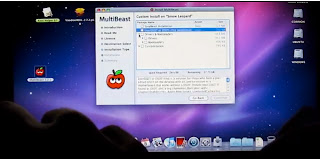
  • Open MultiBeast and keep clicking next till you reach this screen
  • After reaching this screen I installed the following
  • Drivers-->PS2 Drivers
  • Customization-->System Defination-->Mac Pro 8,1
  • Click install


  • After its done click restart and then check everything that it works

Video Version


Blogger Templates