Social Icons

Showing posts with label mac. Show all posts

Monday, April 14, 2014

See this Mac Pro Replica

The new Mac Pro, as powerful an beautiful as it is, looks like,but sorry to say Apple it looks like a trash can
With this idea a German person has created a Mac Pro Hackintosh replica using an actual trashcan.


Here are the specs the user has inserted into it


  •  Core i3 (Haswell), 
  • Gigabyte z87n wifi, 
  • Radeon 7750, 
  • SDD & HDD, 
  • ATX PSU
Here are more pictures of the replica


Wednesday, March 12, 2014

How To Set Time Problems in Dual/Triple Booting Computers

Here's how you can fix incorrect time between 2 or 3 OSes


  • Change time in Windows to the region
  • Change time to Mac osx too
  • If it works then great if it doesn't then do this


  1. Win+R
  2. Type "regedit.exe"
  3. Navigate to HKEY_LOCAL_MACHINE\SYSTEM\CurrentControlSet\Control\TimeZoneInformation. 
  4. Right click anywhere in the right pane and hit 
  5. New > DWORD (32-bit) Value. 
  6. Name it RealTimeIsUniversal, then double click on it and give it a value of 1
  7. Restart to Mac or Ubuntu
  8. Check time again

Monday, February 17, 2014

How to triple Boot Computer- Part 6 - Setting Up Bootloader


This is part 6 of How to triple Boot Computer, and this time I am going to setup the Bootloader, which will help you to choose to boot any one os


  • Open Easy BCD

  • Install and then run it
  • Click on "Add new Entry"

  • Click on Mac-->Type any name, Mode--> MBR
  • Click on Add Entry
  • Restart your computer&Check all the OS'es
  • Enjoy your newly triple booted Computer


Video Version


Monday, February 10, 2014

How to triple Boot Computer-AIO Thread

How to triple Boot Computer- Part 5 - Ubuntu 12.10 Installation


This is part 5 of How to triple Boot Computer, and this time I am going to install Ubuntu 12.10


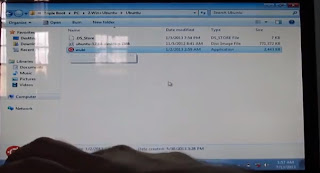
  • Open Wubi

  • The Ubuntu .iso file should be in the same folder
  • Choose the drive you want to install Ubuntu into

  • Input the username and password
  • Then click install

  • After the installation has been completed, then restart the pc

  • After it has restarted, boot to Ubuntu and let it set it up itself


  • Next, i am going to install a bootloader which will help to boot anyone of the os'es


Video Version

Monday, February 3, 2014

How to triple Boot Computer- Part 4 - Windows 7 Installation


This is part 4 of How to triple Boot Computer, and this time I am going to install Windows 7


  • Insert the Win 7 DVD
  • Let it boot from it

  • Wait till it loads to the following screen

  • Choose the language you want to install into i chose "English"
  • Click Next
  • Click on I Accept
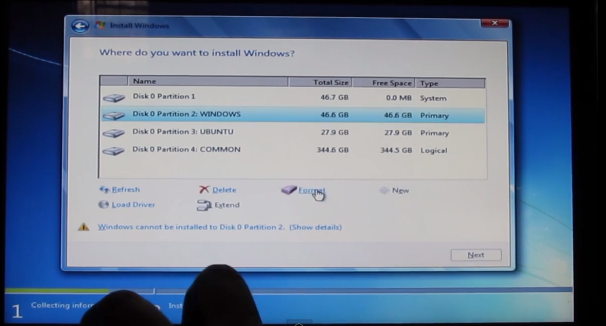
  • When choosing the installation drive
  • Click on the windows drive and format it


  • And click next
  • After a little time the installation will be sucessfull
  • You will reach the desktop

Video Version


Monday, January 27, 2014

How to triple Boot Computer- Part 2- Mac Installation


This is part 2 of how to triple boot your computer or pc. I will install Mac onto the laptop now

Here are the steps


  • Insert the dvd into the drive and restart, it will boot osx


  • When the loader starts interrupt it by pressing f8


  • To make the dvd load properly i had to insert the following flags-"busratio=17(space)-v"without quotes
  • To see which flag u have to insert please search google
  • It might take a while to load


  • Choose the language u r familiar with i chose english


  • Click continue


  • Then click on agree
  • On the upper bar click on the last option and choose disk utility


  • I created 4 partitions 
for Mac 50 gb- osx journaled
for Win 50 gb -fat
for Ubuntu- 30 gb fat
for Common drive 370 gb fat

  • Then click apply
  • Then click on snow leopard and click customise
  • I checked 
Chameleon RC5
Graphics Enabler
Network-LAN-Attansia- L1
Wlan- Broadcom Fix(Wifi doesn't work)
Laptop & USBFix


  • To check what works for you please check on google
  • Everything works on mac except wifi on this laptop because of some drivers
  • Then the installation will take place, it may take a while
  • Let it restart itself


  • Then remove the dvd
  • It will boot to the setup and the awesome video


  • Complete the setup and you will get onto the mac's desktop if you have completed everything successfully

Video Version


Monday, January 6, 2014

Downloads- Triple Boot

How to triple Boot Computer- Part 1 - Intro


This is part 1 of how to triple boot your computer or pc. in this video i will introduce you the basics of the tutorial. I will be triple booting acer aspire 5745g the specs are
  • Operating system installed: Windows 7 Home Premium(64bit) 
  • Processor type: 2.26GHz Intel Core i5 Mobile Processor M430,Turbo Boost 2.53ghz. 3 MB L2 Cache, 1066 MHz FSB 
  • Memory: 4GB DDR3 RAM Supports upto 8GB RAM 
  • Hard Disk: 500GB HDD 
  • Optical drive:SuperMulti 8X DVD±R/RW with Double Layer Support 
  • Display size and resolution: 15.6-inch WXGA High-Definition WideScreen 1366×768
  • Graphics:Nvidia GT 330m 2 GB Dedicated Graphics Card 
  • Network: Ethernet Lan, Wireless LAN(b/g/n) 
  • Webcamera and Microphone: Webcam with Integrated Microphone 
  • Ports: 3 USB 2.0, 1 HDMI, 1 VGA,HDMI, 1 RJ-45, 1 Stereo headphone-out, 1 Microphone in
  • Speakers: Dolby Stereo Speaker 
  • Battery and Power Charger: 6 cell Battery ( approx 3.0 hours backup)


To see if your hardware is compatible or not please check on Google

I will be installing mac osx snow leopard, windows 7, and ubuntu 12.10. First you will have to download the iso file of the os'es links here. After downloading them, burn them up into a dvd, except the ubuntu.

You will need to do some changes in you bios-
Go to your bios and change graphics to discrete.


Video Version


Wednesday, December 18, 2013

The Correct Way to Wrap Your MacBook Pro's Cord

Here is the correct, cheap way(by not breaking both your bank and the cord) way to wrap your MacBook Pro's Cord


Tuesday, December 3, 2013

Free your Mac HDD with this app

Need more space on your Mac's Hdd?? Here's what you can do!!

This 10$ Application called DaisyDisk(ya!! thats a pun on Daisy Duck)can clean all the un used hdd space


DaisyDisk gives you a perfect overview of all the disks connected to your Mac, be it Macintosh HD, flash card, Thunderbolt disk or network storage. The list and disk usage gauges are updated in real time, so you always can tell if there's enough space for installing a new game or downloading an HD movie. Need a detailed look? Just scan a disk and see all of your files and folders as a visual interactive map. Found an unusually large file? Preview its content and delete if you don't need it anymore.


Thursday, September 5, 2013

How to triple Boot Computer- Part 3- Mac's Drivers


This is part 3 of how to triple boot your computer or pc. I will install Mac's Drivers onto the laptop now

Here are the steps
  • Download the kexts from here
  • Install VoodooHDA 2.7.2
  • Keep clicking next till you reach password and input password then
  • Open Kext Helper B7
  • Drag Atheros into the Kext Helper B7


  • After the installation finishes, Restart the Laptop
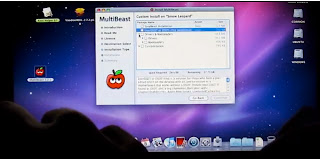
  • Open MultiBeast and keep clicking next till you reach this screen
  • After reaching this screen I installed the following
  • Drivers-->PS2 Drivers
  • Customization-->System Defination-->Mac Pro 8,1
  • Click install


  • After its done click restart and then check everything that it works

Video Version


Wednesday, June 26, 2013

WWDC 2013 Roundup-Part4

In this year's WWDC Apple introduced some things that were quite unique here is a roundup

OSX Maveric

Apple also introduced OSX Maverics with the following new features

  • Finder Tabs
  • Full screen apps on multiple monitors
  • New Apple maps(sigh!)
  • iBooks
  • Faster Safari


WWDC 2013 Roundup-Part3

In this year's WWDC Apple introduced some things that were quite unique here is a roundup

iOS7

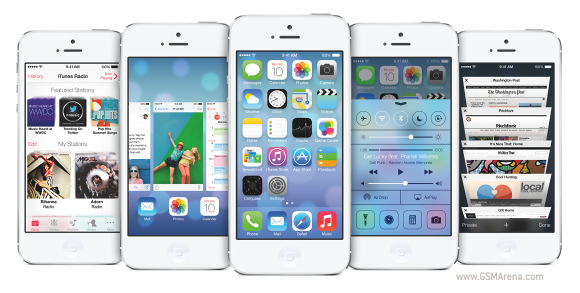
iOS7 saw a lot of changes since its inception here is a list of changes

  • Full Design change
  • Android-esque "Control Center"

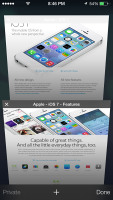
  • The Safari now gets a unified search service and 3d tabs

  • Airdrop-Share anything with iPhone 4 and above devices
  • New camera UI


  • SIRI with a man's voice
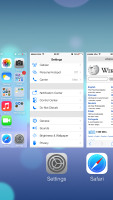
  • New Multitasking UI


  • Unlock the phone, and icons drift down 
  • Revamped weather app shows dynamic weather animations onscreen; pinch for all-city overview
  • Night mode for maps iCloud photo-sharing
  • iCloud keychain remembers sensitive data 
  • Long MMS support Swipe from day to day in Calendar Phone, FaceTime, and Message blocking
  • View PDF annotations 
  • Activation lock to protect against theft 
  • Support for 60fps video capture 
  • New App store UI 
  • Volume purchase from app store  
  • Maps bookmark synching 
  •  Notification sync Smart download for TV episodes 
  • Smart mailboxes 
  • Wi-Fi hotspot 2.0 
  • Tweaked mail search Inclinometer support AirDrop from activity sheet 
  • Background asset downloads Per app VPN Single sign-on for Enterprise
It will launch this fall

Compatible Devices


  • iPhone 4 
  • iPhone 4S 
  • iPhone 5 
  • iPad 2 
  • 3rd generation iPad with Retina
  • 4th generation iPad with Retina 
  • iPad Mini 
  • 5th generation iPod touch
 
 
Blogger Templates