Video courtesy: Cult of mac
Showing posts with label OSX. Show all posts
Showing posts with label OSX. Show all posts
Friday, March 15, 2013

Wednesday, February 6, 2013
How To Get ML like notifications in older OSX
Here's how you can get Mountain lion like notifications in older OSes
Download Growl from here
Install it
Go to preferences--> Display-->Style--> Mountain Lion
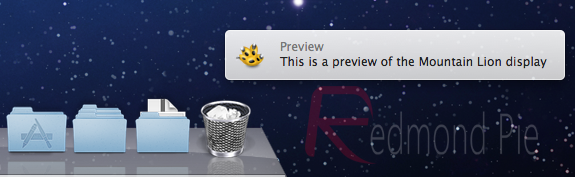
Download Growl from here
Install it
Go to preferences--> Display-->Style--> Mountain Lion
Monday, January 14, 2013
How To Install Mountain Lion(downloaded from Torrent) on USB
Here's a trick that might work if you are having problems installing ML onto your USB
1.Install OSX onto your Hard Drive or atleast Virtually to how do that see tutorial here: HDD Virtually
2.Download ML from torrent
3.Download Show Hidden files from here
4.Mount "Install ESD"
5. Open Show Hidden Files-->Show Special Files
6.Find Base System.dmg and Mount it
7.Copy Install OSX.app to Applications
8. Attach your 8GB or more pen drive and format it to Mac OSX Journaled
9. Download Unibeast from here
10.Install Unibeast on USB
How To install OSX onto your Virtual HDD-Intel+ AMD CPU
I do not take responsibility if anything happens to your computer
The most easiest settings you can do are these
1. Download a OSX modded to run on a windows based pc atleast Snow Leopard the best ones are-10.6.6i by Hazard, iAtkos S3V2
2. I will be using 10.6.6i by Hazard for this as this is very good for modern computers
3. Download VirtualBox from here
4.Install & Run VB
5.Create a new Virtual Machine and name it mac
6. It will automatically detect it is a mac
7. Make a 20 GB Dynamic HDD
8.Keep on clicking next till you reach Summary
9. Go to settings -->System and uncheck EFI
10. Click on storage and give the link to virtual .iso drive
11. Let it boot
12. Keep on clicking next till you reach onto hard drive installation
13. Choose any hard drive and format it to Mac OSX Journaled
14. Choose any size you want
15.Click on Customize and click on the latest Chameleon in this case "Chameleon RC5" and kernel
7. Let it install and sooner or later you will reach your Desktop
Thursday, January 10, 2013
How To install OSX onto your HDD-Intel+ AMD CPU
Well first of all the installation of mac onto your HDD depends onto your computer's specifications. Secondly i do not take responsibility if anything happens to your computer
The most easiest settings you can do are these
1. Download a OSX modded to run on a windows based pc atleast Snow Leopard the best ones are-10.6.6i by Hazard, iAtkos S3V2
2. I will be using 10.6.6i by Hazard for this as this is very good for modern computers
3. Keep on clicking next till you reach onto hard drive installation
4. Choose any hard drive and format it to Mac OSX Journaled
5. Choose any size you want
6.Click on Customize and click on the latest Chameleon in this case "Chameleon RC5" and kernel
7. Let it install and sooner or later you will reach your Desktop
Friday, November 30, 2012
Cydia For Your Mac
If you like to customize or install apps to your mac which are not available on the iOS store then, you're gonna love this!!
Behold the Hackstore, the cydia for the Mac.
The Hackstore lets you install apps that are not available in the iOS store

Here's the link to the website of the creator
Behold the Hackstore, the cydia for the Mac.
The Hackstore lets you install apps that are not available in the iOS store
Here's the link to the website of the creator
Monday, July 30, 2012
Run Android Apps on Your PC/Mac
If you wanted to play some game that you like to play on your Android device on the PC, then I have the perfect App for you. It's called "Bluestacks".
The app is a free 3.6 MB download, but needs a little more after installation. Has it's own app store but misses out on the Google Play
Pros
4/5 Star Rating

The app is a free 3.6 MB download, but needs a little more after installation. Has it's own app store but misses out on the Google Play
Pros
- Runs apps without a hitch
- Small download size
- Free
- Cannot mirror Android Device on PC/Mac
- Need to sync device to the software
4/5 Star Rating
Subscribe to:
Posts
(
Atom
)


