Social Icons

Wednesday, May 29, 2013

Android Tips&Trick-Part 2

This tips and tricks is mainly for Android users which have OS V4.0 and above


6.Install new keyboard to improve accuracy The standard Android keyboard is good, but not great. There are many third party keyboards available which will improve your typing speed and accuracy. Go to the Android Market and search for 'Keyboard' to see some great alternatives, many of which are more accurate and make typing much easier.  A good one is GoKeyboard.  If you see a warning saying the keyboard will collect all information (including credit cards) just ignore this. This is just a security feature that Android shows for every third-party keyboard that you install.

7.Accents and special characters If you want to type non-English letters (eg those with an accent), long-press on the relevant letter. A list of options will appear for you to select.

8.Access the scientific calculator To access the scientific calculator, rotate the phone to landscape mode.  The calculator will change to a scientific one

9.Add email or phone number from text To add an email or phone number to your contacts from a text message, you can long-press on the email / phone number. Then select Add to contacts

 10.Add widget to the homescreen To add a widget, go to the homescreen and press the Apps icon (the circle with 6 dots). Then you will see a list of your Apps with the word Apps and Widgets at the top. Press Widgets, then you will be presented with a list of available widgets. To add a widget, press and hold on it and then position it where you want


Android Tips&Trick-Part 1

This tips and tricks is mainly for Android users which have OS V4.0 and above


1.Avoid task killers It is best to avoid task killers such as Advanced Task Killer. Android is designed to automatically pre-load certain applications, even if you don't load them yourself. If it starts to run low on memory, it will smartly unload the oldest running apps automatically. Manually killing tasks will only mean they get loaded in memory again. Task killers can make the phone slow, laggy, or drain battery life more quickly.

2.Bookmark a contact on your homescreen To bookmark a contact on your homescreen, long press on the home screen background and select Shortcuts. Then select Direct dial. If you call someone regularly this can be useful as you will have a shortcut to them handily placed on your homescreen 

3.Bookmark a web page on your homescreen To bookmark a website on your homescreen, go into your browser and find the bookmark of the page you want to create a shortcut for.  Then long press on the bookmark and select Add Shortcut to Home. If you regularly visit certain websites, this can be handy as you will have a shortcut to the site on your homescreen. 

4.Create folders to tidy your Apps If you find yourself with too many Apps on the homescreen, then you can create folders to organise them. To start, simply press and hold on an App and drag it over the top of another App. The App should change colour/shape. Then release your finger and the two Apps will be combined into a folder.  You can then drag more Apps into this folder using the same process. To give your folder a label, simply long press on the folder and you will be able to enter a name.

5.Double tap for a full stop (period) While typing emails or notes, you can simply tap the space key twice and the phone will insert a full stop / period

Tuesday, May 28, 2013

QuickWidgets-For iDevice-Cydia

Are you one of those people who like android widgets and would like to use it on your beloved iDevice?

Then fret no more because I bring you QuickWidgets

Sorry if this sounds like a detergent advertisement. But it sure works(the widgets not the ad)

So this Cydia tweak lets you install widgets on your iDevice's lockscreen. You can customize it to your heart's content, you can also resize.

'Nuff said download this app and enjoy!!


Add this Cydia repo "http://cydia.myrepospace.com/antoniorizado/" and search QuickWidgets

iOS 7

Don't get alarmed, the iOS7 has not been launched and this post tells you what it might look like

The WWDC 2013 is right around the corner, and what i've heard is there will be a new osx and a new minimalistic ios 7, which might be true because Apple is going to launch a cheaper iPhone this year and    it might be a little less powerfull

Here are the concept images


Monday, May 27, 2013

Check You Battery % Correctly-Android

Now a days the phones are getting smarter and the batteries are huffing and puffing to catch up. So you need to keep an eye on the battery meter

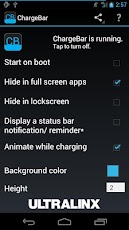
ChargeBar is a highly-customizable, completely-free MIUI battery bar application for ANY Android device on ANY ROM, with or without root! Just pick a color (or set of colors), position, height and go! What makes ChargeBar unique? ChargeBar is the only MIUI battery bar application that can accurately automatically hide in fullscreen apps (great for those who want to have ChargeBar be translucent and overlay their status bar), and it is the only MIUI battery bar application that lets YOU set what colors you want to display when. No predefined ranges means that you are 100% in control!


LG launches Quick Voice

LG launched Quick Voice to compete with Siri and Samsung's S Voice.

The company has announced this new service in Korea and chances are that it will be rolled out soon to the Optimus family of smartphones. A couple of voice-based assistants are already available for the Android platform and it seems that LG have come pretty late to the party, but this service is planning on integrating new features, including using it when the phone is turned off, along with increased customizations.voice recognition will impress you quite a lot.

For simple things, like placing alarms, reminders, calls and text messages, it works quite well. But sometimes you’ll have to repeat, repeat and REPEAT what you want the assistant to do, if you’re speaking in a conversational tone. Which will really make you wonder, if you could just do it the ‘old fashioned’ way - type it out, and finish it yourself!


Thursday, May 23, 2013

Sorry

Sorry guys i was not able to post on my blog for about a week or so because my exams are coming and i really need to study. You guys will probably read my blog posts starting this monday

Friday, May 10, 2013

Top ways to get a free WIFI-Part 1

We use Internet more than we eat these days and if you are like me who likes to surf the net, then free WIFI is like heaven for you and here are the top ways you can get free WIFI

1.Ask which restaurants have WIFI

2. Use Hotspot DataBase-You can install a software called Wefi. They have a Wifi Database for more than 100 Million and counting

3.Search for hidden networks-The best place to look for WIFI is electronic shops because they need wifi to show how things work

4.Other Places-Some places like Airplanes provide internet for a little price

5.Signup-Some places for a little price provide you internet, sign up with them

Top ways to get a free WIFI-Part 2

We use Internet more than we eat these days and if you are like me who likes to surf the net, then free WIFI is like heaven for you and here are the top ways you can get free WIFI

6.MAC Spoof-Sometimes in some places the internet expires and then you need to pay to get more. You can spoof your mac id to replenish your thirst for internet

7.Tethering

8.Hacking into protected networks


Thursday, May 9, 2013

See this Awesome Phone Stand

Presenting the iDuck the best Phone stand ever!!!


  • iDUCK is a stand for all mobile phones and small pads. 
  • It is made of eco-friendly material, silicone. 
  • The silicone duck beak is designed to make a convenient angle for users. Also it has other functions.
  • The cap at the back of the duck beak can be open, so you can keep small mobile accessories like earphones in it.
  • With the small strap in the package, you can use this duck beak as a key holder. 
  • iDUCK and the sticker in the package will transform your phone to a cute duck.


How to install .deb File on iDevice-Part 3


There are tweaks you might need on your iDevice and they are not available without Jailbreaking and these tweaks come in .deb file format and this is how you can install .deb files


Methods to install a .deb file into your iOS, choose the easier for you! Applicable to:
 iPhone (3G/3Gs/4/4s), iPod touch (3G/4G), iPad/iPad 2/iPad3 iOS 4.0+/ iOS 5.0 +


3rd Method: AutoInstallation Folder 
Requirements: SSH Client (iFunbox for Windows/Cyberduck for MacOS) Download iFunbox >> (www.i-funbox.com) Windows , or Cyberduck for MacOS
Download desired (.deb) file to your desktop
Run iFunbox and connect your iOS (iPhone, iPod or iPad)
iFunBox will show your device contents,
Now navigate to var/root/Media/ Create the folder Cydia/AutoInstall (if not already created)
Move (.deb) file from your desktop to var/root/Media/Cydia/AutoInstall
Reboot your iOS
YOU ARE DONE

Wednesday, May 8, 2013

How to install .deb File on iDevice-Part 2


There are tweaks you might need on your iDevice and they are not available without Jailbreaking and these tweaks come in .deb file format and this is how you can install .deb files


Methods to install a .deb file into your iOS, choose the easier for you! Applicable to:
 iPhone (3G/3Gs/4/4s), iPod touch (3G/4G), iPad/iPad 2/iPad3 iOS 4.0+/ iOS 5.0 +

2nd Method: Install with SSH Client + iFile
 Requirements: SSH Client (iFunbox for Windows/Cyberduck for MacOS) + iFile Download iFunbox >> (www.i-funbox.com) Windows , or Cyberduck for MacOS
Download desired (.deb) file to your desktop Run iFunbox and connect your iOS (iPhone, iPod or iPad)
iFunBox will show your device contents, Now navigate to any folder for example: var/mobile/Documents
Move (.deb) file from your desktop to var/mobile/Documents
Run iFile from your iOS, and navigate to the same folder i.e. var/mobile/Documents
Click on (.deb) file and select install
YOU ARE DONE

How to install .deb File on iDevice-Part 1

There are tweaks you might need on your iDevice and they are not available without Jailbreaking and these tweaks come in .deb file format and this is how you can install .deb files


Methods to install a .deb file into your iOS, choose the easier for you! Applicable to:
 iPhone (3G/3Gs/4/4s), iPod touch (3G/4G), iPad/iPad 2/iPad3 iOS 4.0+/ iOS 5.0 +

1st Method: Install with iOS Safari Browser + iFile
 Requirements: iPhone/iPod/iPad Safari Browser + iFile

 Download .deb file with iPhone/iPod/iPad Safari browser
Choose >> Open in “iFile”
Once iFile opens >> Select Installer Respring
YOU ARE DONE


Tuesday, May 7, 2013

Top 2 Apps For Accessing Your Documents From Anywhere

Earlier, people used to work from their PC, then came laptop they could move from the pc to. Then came the revolution-Smartphones then came apps.

Now a days you can make, edit your documents from your mobile, tablet and here are the top picks for Accessing Your Documents From Anywhere


  • Documents To Go-
You can Edit , View & Create Microsoft Word, Excel, & PowerPoint files & viewyour PDF files. Also Supports password protected Word & Excel 97-2008 files, Google Docs support! Download, view & edit your files from your Google Docs directly in Docs To Go.  Desktop Application for bi-directional synchronization with your device’s USB cable. Seamlessly move files from device to computer (Available on Windows Only*) using our new, and FREE desktop app


Link here


  • Google Docs- Google Docs is now a part of Google Drive! With Google Drive, you can store all your files in one place, so you can access them from anywhere and share them with others Use the Google Drive Android app to access your photos, documents, videos and other files stored on your Google Drive Upload files to Google Drive directly from your Android device  Share any file with your contacts  Access files others have shared with you on Google Drive  Make any file available offline so you can access them even when you don't have an Internet connection  Manage files on the go  Create and edit Google documents with support for tables, comments and rich text formatting Create and edit Google spreadsheets with support for text formatting, multiple sheets and sorting Edits to your Google documents and spreadsheets appear to collaborators in seconds  View Google presentations with full animations and speaker notes  View your PDFs, Office documents and more  Upload and convert files to the Google Docs format  Take a photo of printed text and convert it to Google Docs format  Print files stored in Google Drive on the go using Google Cloud Print  Open files stored in Google Drive through Drive enabled apps in the browser  Optimized experience to take advantage of larger screens for tablet users, Honeycomb (Android 3.0+)
Link here


How to boot directly to Windows UI in Win8

Windows 8 had brought a new UI, the metro(or modern). This new UI was a boon for Touchscreen users, but a bane for the keyboard, mouse guys so now you can keep the windows UI with a little tinker


  • Download Win 8 Metro UI switcher from here
  • Install the program
  • Click on Disable Metro UI
  • Enjoy


Monday, May 6, 2013

How Companies Got Their Names-Part 2

Here is a list which explains how these companies got their names
  • SUN Founded by 4 Stanford University buddies, SUN is the acronym for Stanford University Network. Andreas Bechtolsheim built a microcomputer; Vinod Khosla recruited him and Scott McNealy to manufacture computers based on it, and Bill Joy to develop a UNIX-based OS for the computer. 

  • Apache It got its name because its founders got started by applying patches to code written for NCSA's httpd daemon. The result was 'A PAtCHy' server - thus, the name Apache Jakarta (project from Apache): A project constituted by SUN and Apache to create a web server handling servlets and JSPs. Jakarta was name of the conference room at SUN where most of the meetings between SUN and Apache took place. 

  • Tomcat The servlet part of the Jakarta project. Tomcat was the code name for the JSDK 2.1 project inside SUN. 

  • C Dennis Ritchie improved on the B programming language and called it 'New B'. He later called it C. Earlier B was created by Ken Thompson as a revision of the Bon programming language (named after his wife Bonnie). 

  • C++ Bjarne Stroustrup called his new language 'C with Classes' and then 'newC'. Because of which the original C began to be called 'old C' which was considered insulting to the C community. At this time Rick Mascitti suggested the name C++ as a successor to C. 

  • GNU A species of African antelope. Founder of the GNU project Richard Stallman liked the name because of the humour associated with its pronunciation and was also influenced by the children's song 'The Gnu Song' which is a song sung by a gnu. Also it fitted into the recursive acronym culture with 'GNU's Not Unix'. 

  • Java Originally called Oak by creator James Gosling, from the tree that stood outside his window, the programming team had to look for a substitute as there was no other language with the same name. Java was selected from a list of suggestions. It came from the name of the coffee that the programmers drank. 
  • LG Combination of two popular Korean brands Lucky and Goldstar. 

  • Linux Linus Torvalds originally used the Minix OS on his system which here placed by his OS. Hence the working name was Linux (Linus' Minix). He thought the name to be too egotistical and planned to name it Freax (free+freak+x). His friend Ari Lemmke encouraged Linus to upload it to a network so it could be easily downloaded. Ari gave Linus a directory called 'Linux' on his FTP server, as he did not like the name Freax. (Linus parents named him after two-time Nobel Prize winner Linus Pauling).
  • Mozilla When Marc Andreessen, founder of Netscape, created a browser to replace Mosaic (also developed by him), it was named Mozilla (Mosaic-Killer, Godzilla). The marketing guys didn't like the name however and it was re-christened Netscape Navigator.

  • Red Hat Company founder Marc Ewing was given the Cornell lacrosse team cap (with red and white stripes) while at college by his grandfather. He lost it and had to search for it desperately. The manual of the beta version of Red Hat Linux had an appeal to readers to return his Red Hat if found by anyone! 

  • SAP "Systems, Applications, Products in Data Processing", formed by 4 ex-IBM employees who used to work in the 'Systems/Applications/Projects' group of IBM. 

  • UNIX When Bell Labs pulled out of MULTICS (MULTiplexed Information and Computing System), which was originally a joint Bell/GE/MIT project, Ken Thompson and Dennis Ritchie of Bell Labs wrote a simpler version of the OS. They needed the OS to run the game 'Space War' which was compiled under MULTICS. It was called UNICS - UNIplexed operating and Computing System by Brian Kernighan. It was later shortened to UNIX. SCO (UNIX) From Santa Cruz Operation. The company's office was in Santa Cruz. 

  • Xerox The inventor, Chestor Carlson, named his product trying to say 'dry' (as it was dry copying, markedly different from the then prevailing wet copying). The Greek root 'xer' means dry. 

  • Yahoo The word was invented by Jonathan Swift and used in his book 'Gulliver's Travels'. It represents a person who is repulsive in appearance and action and is barely human. Yahoo! founders Jerry Yang and David Filo selected the name because they considered themselves yahoos. 

  • 3M Minnesota Mining and Manufacturing Company started off by mining the material corundum used to make sandpaper. It was changed to 3M when the company changed its focus to Innovative Products.

How These Companies Got Their Names-Part 1

Here is a list which explains how these companies got their names

  • Nike Named for the Greek goddess of victory. The swoosh symbolizes her flight. 
  • Skype The original concept was Sky-Peer-to-Peer, which morphed into Skyper, then Skype.
  • Mercedes This was actually financier's daughter's name. 
  • Adidas The company name was taken from its founder Adolf (ADI) Dassler whose first name was shortened to the nickname Adi. Together with first three letters of his surname it formed ADIDAS.

  • Adobe This came from the name of the river Adobe Creek that ran behind the house of founder John Warnock. 

  • Apple Computers It was the favorite fruit of founder Steve Jobs. He was three months late for filing a name for the business, and he threatened to call his company Apple Computers if the other colleagues didn't suggest a better name by 5 o'clock. 

  • CISCO It is not an acronym as popularly believed. It's short for San Francisco. 
  • Compaq This name was formed by using COMP, for computer and PAQ to denote a small integral object. 

  • Corel The name was derived from the founder's name Dr. Michael Cowpland. It stands for Cowpland Research Laboratory. 

  • Google The name started as a joke boasting about the amount of information the search-engine would be able to search. It was originally named 'Googol', a word for the number represented by 1 followed by 100 zeros. After founders - Stanford graduate students Sergey Brin and Larry Page presented their project to an angel investor; they received a cheque made out to 'Google'. So, instead of returning the cheque for correction, they decided to change the name to Google. 

  • Hotmail Founder Jack Smith got the idea of accessing e-mail via the web from a computer anywhere in the world. When Sabeer Bhatia came up with the business plan for the mail service, he tried all kinds of names ending in 'mail' and finally settled for hotmail as it included the letters "html" - the programming language used to write web pages. It was initially referred to as HoTMaiL with selective uppercasing. 

  • Hewlett Packard Bill Hewlett and Dave Packard tossed a coin to decide whether the company they founded would be called Hewlett-Packard or Packard-Hewlett. 

  • Intel Moore and Noyce initially wanted to name the company "Moore Noyce".The name, however, was a partial homophone for "more noise" – an ill-suited name for an electronics company, since noise in electronics is usually very undesirable and typically associated with bad interference. Instead they used the name NM Electronics for almost a year, before deciding to call their company Integrated Electronics or "Intel" for short. Since "Intel" was already trademarked by the hotel chain Intelco, they had to buy the rights for the name. 
  • Lotus (Notes) Mitch Kapoor got the name for his company from 'The Lotus Position' or 'Padmasana'. Kapor used to be a teacher of transcendental Meditation of Maharishi Mahesh Yogi.

  • Microsoft Coined by Bill Gates to represent the company that was devoted to MICRO computer Software. Originally christened Micro-Soft, the '-' was removed later on. 

  • Motorola Founder Paul Galvin came up with this name when his company started manufacturing radios for cars. The popular radio company at the time was called Victrola. 

  • Sony It originated from the Latin word 'sonus' meaning sound and 'sonny' as lang used by Americans to refer to a bright youngster. 

Friday, May 3, 2013

RIP Windows XP

Very soon all windows xp users will be told to migrate either to windows 7 or windows 8. As per some Microsoft's blog they will be stopping all support for windows xp on 8/4/2014, and that's less than a year!! here's what exactly the post said

If your business is still running Windows XP, now is the time to upgrade to a modern OS.
In 2001, Windows XP was launched, and went on to become Microsoft’s most popular operating system of its time, aiding consumers and business users to be more productive and secure as high-speed Internet became ubiquitous at work and eventually in our homes. It’s no question that Windows XP was an outstanding operating system to meet the needs of customers more than a decade ago.
This natural evolution of technology is what is at the heart of our product lifecycle policy. A year from now will mark the final milestone for Windows XP – that of its end of support date. Starting April 8, 2014, Microsoft will no longer provide support for Windows XP users. This means that customers and partners will no longer receive security updates to the operating system or be able to leverage tech support from Microsoft after this time.
Moving away from Windows XP to a more modern platform in Windows 7 and Windows 8 will ready your IT infrastructure for future technology solutions and growth of your company. 

Batman Arkham Origins-1st ScreenShots

Here's an awesome news for all you Batman Fanboy/Girls. A new arkham game is coming in October 25 2013, and it will be called Arkham Origins. It will be available on PC, Xbox 360, PS3, WiiU and here are the screenshots


Thursday, May 2, 2013

New Angry Birds Game Announced

A new Angry Birds iteration has been announced by Rovio and this time will be based on Lord Of The Rings     here is the new cover art

and here is some leaked info according to a website


The story is simple and inspired by the great novels of Tolkien. The goal is to destroy every orc in each level of Isengard & Mordor kingdoms. An Ed (it’s your slingshot, don’t get confused) will shoot your “birds” against the Orcs. If your attack is well planned and you destroy the orcs with the minimum required “birds” you’ll get a 3 star score. 3starscoring (sic) on all levels of Isengard and Mordor will unlock a new kingdom (Moria) that will be available to conquer.

MEET THE NEW LOTR CHARACTERS
 Red Bird: Frodo will be your first bird replacing the red bird of the original game. He can use his sword (Sting was its name) after completion of the entry levels.
Yellow Bird: Legolas with his impressive bow skills. He’ll be able to kill orcs in the steepest places.
Blue birds: The 3 Hobbit friends of Frodo (Merry, Pippin and Sam) will be shot as a team and the tap effect will split them.
White bird: You might already suppose who will be the white bird before my description. Yes, it’s Gandalf, the white. He carries his stick all the time, and by tapping, he’ll push everything on that tap direction, killing orcs and goblins or sending objects towards them.
 Big Brother bird: Gimli will be our bomb bird who will shake everything when he’s activated.
Black Bird: Aragorn. I haven’t come up with an idea which bird he’ll replace and what his abilities will be. So, please comment here with your suggestions!
GAMEPLAY
 Not much to talk about the gameplay of Angry Birds Lord of the Rings if you have already played the Star wars edition. Legolas will help reaching orcs & goblins with his shots where your Ed won’t be able to do. The push ability of Galdalf will help you redirect catapult shots of your enemies against them.
 GREAT EAGLES
 Acquiring stars will help you getting the Great Eagles by your side. You’ll be able to use them when you can’t pass a level or you just did everything else on the game!
 GOLDEN RINGS OF POWER
 The 9 Rings of Power will be spread to the kingdoms of Isengard & Mordor and each ring’s destruction will give you a bonus level to play just like the golden eggs of the rest angry birds games.

Floating Widgets-Android

Android has always been very customizable, but with this app(or addon)it will be custom heaven.
I present to you Overlay, with this app you can make your widgets float on any app(yes app not homescreen)

Available on Google Play for free

Review Score 4.8/5

Wednesday, May 1, 2013

Best Windows Phone Games -Part 1-Adventure

Gaming on the mobile phone is on the rise and the Windows Mobile is the rising star of the Mobile world. Here are my picks from it

Adventure


  • Assassin's Creed

  • Splinter Cell: Conviction

Micromax sold 1 Million Canvas Devices

Indian mobile developer Micromax claims that they have sold over 1 Million Devices. This what micromax had to say

The Canvas series has proved to be a trendsetter in Indian smartphone segment. The demand for these devices has been on an upward curve from the time of their launch. These are our flagship models and the overwhelming consumer response has made us confident that we are headed towards the right direction.


Blogger Templates