Social Icons

Showing posts with label blackberry. Show all posts

Wednesday, July 2, 2014

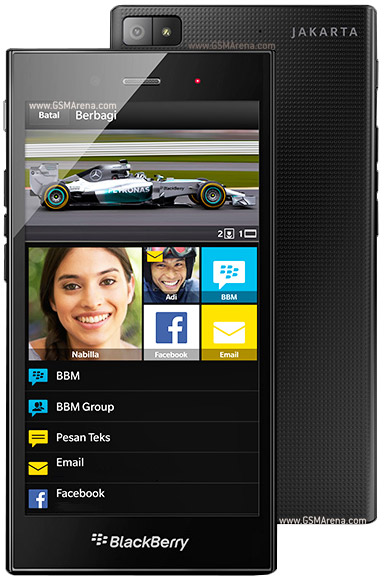
BlackBerry Launches Z3

The Canadian mobile manufacturer BlackBerry has launched the Z3 in India.
Here are its specifications


  • 5.0 Inches 220PPI Display- 540x960 Resolution 
  • Accepts Micro SD upto 32 GB
  • 8 GB Internal Memory
  • 1.5 GB RAM
  • 5 MP, 2592 Ñ… 1944 pixels camera
  • 1.1 MP Front Camera
  • Runs on BlackBerry 10.2.1 OS
  • Powered By Qualcomm MSM8230 Snapdragon 400-Dual-core 1.2 GHz Krait 200
  • GPU is Adreno 305
  • Priced at 15,999 Rupees


Friday, March 14, 2014

BlackBerry Announced 2 Devices

BlackBerry Announced the Following Devices


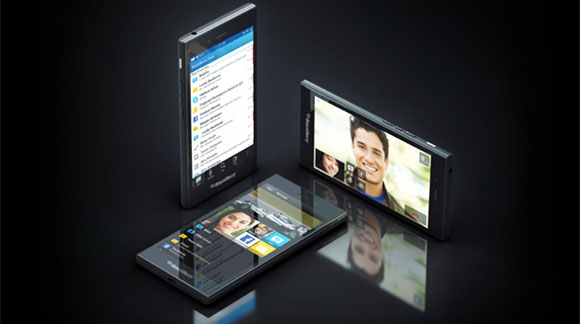
BLACKBERRY Z3


  • 5 Inch Display QHD resolution
  • Runs 10.2.1 BBOS
  • 1.2 Ghz Dual Core Snapgragon 400 Processor
  • 1.5 GB RAM
  • Back-5 MP Camera
  • Front-1.1 MP
  • Comes with FM Radio
  • Will launch in Indonesia in April and will cost less than $200 off contract.


BLACKBERRY Q20


  • Qwerty keyboard+trackpad
  • Menu, Back, Send and End buttons and the trackpad will be made an integral part of the device
  • 3.5" display
  • Made of premium materials

Wednesday, October 2, 2013

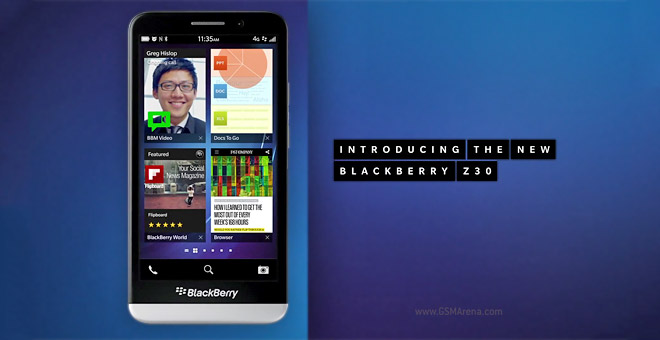
BlackBerry Announced Z30

BlackBerry has announced a new phablet(5") smartphone(pffft), the Z30, and with that they have also announced the new version of BBOS 10, the 10.2

The following are the specs of the phone

  •  5″ AMOLED display with 720p resolution, 
  • Faster processor
  • More battery life 
  • New antenna design 
  • Stereo speakers with Natural Sound tech.


The new features of the 10.2 are

  • The Hub has grown a Priority section that learns who in your messaging history is important and collects priority messages from all accounts (email, social networking and other sources). 
  • BBM Now and Message Preview give you a peek at new messages without having to leave the app and you can even respond to BBM messages.

Monday, September 2, 2013

BlackBerry is going Private!

Canadian Mobile company BlackBerry is said to be going private.The board could take the step of making BlackBerry private in order to raise its sagging fortunes. Sources familiar to the matter told Reuters that the company and its CEO Thorsten Heins had been contemplating the idea of pulling itself from the stock market in order to be able to take some “breathing room” to itself while it tried to fix issues plaguing it. While no decisions have been made yet, the “change of tone” by the board could act as a call to private firms to raise some money to acquire the Canadian company.


Saturday, March 23, 2013

5 Uses of BlackBerry Protect-Part 1

In this day and age, you care about your mobile like your own family member, and this is all for the blackberry boys(and girls).

Here are the uses of BlackBerry Protect a free app on BB World


1. Automatic Backups
 You can use BlackBerry Protect to automatically back up your data daily, weekly, or monthly. When you turn on the automatic backup feature, BlackBerry Protect backs up your data at the specified frequency when your BlackBerry smartphone is connected to the wireless network and you are not using it currently. If your smartphone is turned off or not connected to the wireless network when a scheduled backup is due, BlackBerry Protect backs up your data the next time that your smartphone is turned on and connected.


Note: Password Keeper and Wi-Fi® Network Profiles will be available for backup on BlackBerry® 7 smartphones only. If you use BlackBerry® 6 or earlier, please make a backup using BlackBerry Desktop Software to ensure Password Keeper and Wi-Fi Network profile information is backed up safely.

Friday, March 22, 2013

5 Uses of BlackBerry Protect-Part 2


In this day and age, you care about your mobile like your own family member, and this is all for the blackberry boys(and girls).

Here are the uses of BlackBerry Protect a free app on BB World


2. Protect your Information
If you ever misplace or lose your BlackBerry smartphone, there are several features offered by BlackBerry Protect to help you protect your information. One setting in particular that’s extremely useful is the ability to display a message on a BlackBerry smartphone that can include your contact details in case someone finds it.


5 Uses of BlackBerry Protect-Part 3


In this day and age, you care about your mobile like your own family member, and this is all for the blackberry boys(and girls).

Here are the uses of BlackBerry Protect a free app on BB World


3. Find your BlackBerry smartphone Recently I couldn’t find my BlackBerry smartphone and thought I might have left it at a friend’s after leaving a party the night before. Thanks to BlackBerry Protect, I was saved a trip across town – I was able to log in to the BlackBerry Protect website and view my BlackBerry smartphone’s current location, which indicated it was in my house somewhere. Then, instead of spending time looking around my house, I used the “make my BlackBerry smartphone ring” feature which helped me find my BlackBerry smartphone (in between the cushions of my living room couch!).


Thursday, March 21, 2013

5 Uses of BlackBerry Protect-Part 4


In this day and age, you care about your mobile like your own family member, and this is all for the blackberry boys(and girls).

Here are the uses of BlackBerry Protect a free app on BB World


4. Switch BlackBerry smartphones BlackBerry Protect makes it easier to switch to a new BlackBerry smartphone. All you need to do is perform a backup using BlackBerry Protect on your current phone, followed by logging into BlackBerry Protect on your new BlackBerry smartphone and selecting the restore data option.


5 Uses of BlackBerry Protect-Part 5


In this day and age, you care about your mobile like your own family member, and this is all for the blackberry boys(and girls).

Here are the uses of BlackBerry Protect a free app on BB World


5. Remote Backup In addition to performing automatic backups on a set schedule, you also have the ability to perform a remote backup. This setting is very useful if you have misplaced your BlackBerry smartphone and a backup hasn’t been made recently. Just visit the BlackBerry Protect website, where you can perform a remote backup that can be followed by a remote security wipe to remove your personal information, in case you cannot find your BlackBerry smartphone using the location features provided.


Wednesday, March 20, 2013

5 Uses of BlackBerry Protect-Extra

In this day and age, you care about your mobile like your own family member, and this is all for the blackberry boys(and girls).


As you can see, BlackBerry Protect is a great way to manage your BlackBerry smartphone and is something I recommend every BlackBerry smartphone user, not using a BlackBerry® Enterprise Server or BlackBerry® Enterprise Server Express, install it. If your BlackBerry smartphone is using a BlackBerry Enterprise Server or BlackBerry Enterprise Server Express you will be unable to install BlackBerry Protect, or access it from the Setup Wizard included in BlackBerry 7. For more information, check out KB25065 –Unable to use BlackBerry Protect when the BlackBerry smartphone is active on a BlackBerry Enterprise Server which can be found in the BlackBerry Technical Solution Center.
I wanted to share one more thing as well for those of you using a BlackBerry 7 smartphone. You can prevent a person who finds your smartphone from deleting the BlackBerry Protect application by turning on deletion protection using the following steps.


  • Open BlackBerry Protect
  • Press the Menu key and select Options
  • Select the Enable Deletion Protection checkbox
  • Press the Menu key and select Save

  • To learn more about BlackBerry Protect, such as how to install it and use the features I’ve described above, visit the BlackBerry Protect website today.


    Monday, March 11, 2013

    BlackBerry Z10 Launched

    The much awaited BlackBerry Z10, with their new OS BBOS10 was launched in India for 43,500.

    Earlier in Grey markets the phone was selling at a whooping 70,000 onwards

    For more BB10 news check here


    Tuesday, February 12, 2013

    BlackBerry OS10 Roundup

    BlackBerry recently announced its BB10 OS and some phones here's what was announced

    1.Name changed to Blackberry: RIM now is called BlackBerry

    2.Launched Z10:

    The Z10 is BB OS10's flagship and full touch device


    The Z10 has 

    4.2" 1280x768 Screen
    Qualcomm S4+ Dual Core 1.5 GHZ Processor
    2 GB RAM
    16 GB Internal expandable upto 64 GB
    1800 MaH battery


    3. Q10

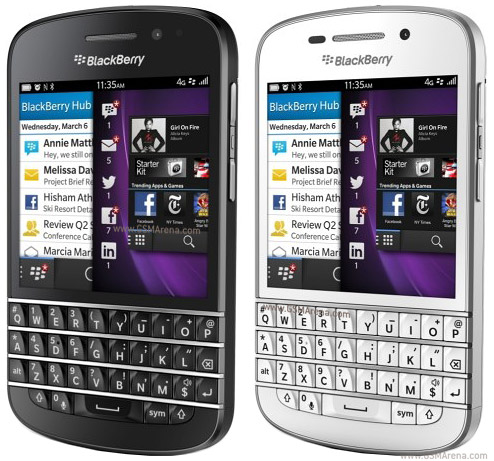
    The Canadian company also launched Q10 the Touch& Type device


    The Q10 has 

    3.1" 720x720 Screen
    Full QWERTY keypad without trackpad
    Qualcomm S4+ Dual Core 1.5 GHZ Processor
    2 GB RAM
    1800 MaH battery


    4.BB Messenger now does video chats

    5.Blackberry Balance: Now you can create 2 different profiles inside one phone

    Wednesday, June 27, 2012

    BlackBerry OS 10

    Blackberry known for its brilliant QWERTY keyboards will not have one in the forthcoming BB OS 10. The phone has a full touchscreen.

    BlackBerry in its World event showcased the OS10, which is the QNX based version. The device shown, apparently will not be the handset launched with OS 10 the final handset is rumoured to have the following specs

    • 4.2 Inch Capacitive TouchScreen
    • Resolution of 1024x768
    • 16 GB of Onboard Memory
    • 1GB of RAM
    • Mini HDMI
    Have a look at the video
    As you can see the phone looks quite interesting and has a well thought off swipe based gesture based system.

    Blackberry Alpha Devices(Photos courtesy Crackberry.com )


    Blogger Templates