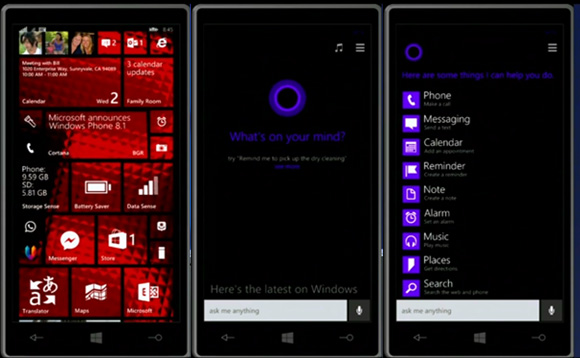
Microsoft announced the following in their build conference yesterday
Apart from boot/resume straight to desktop, Belfiore ran through a few other features, such as Internet Explorer's Enterprise Mode, the synced Bing-Cortana interests. The biggest reveal however, came after the developer side of the conference had begun, with the introduction of Universal Windows apps.
Universal Windows apps can be made by developers using a common code for PC, smartphones and tablets, via an updated Visual Studio 2013 suite. With this feature, Microsoft says it is not expecting developers to code one app that tries to work well on all form factors, but rather, one that is easily adaptable to the various Windows platforms, with the job of porting made easier with the common Windows runtime environment and programming languages used in developing them.
Here is a gist of the new features, tweaks and customization ported to Windows 8.1 Update 1:
Boot to Desktop by Default
The modern Start Screen that had bewildered new PC users trying to adopt the latest Windows platform is no longer a concern, as Microsoft has tweaked the system settings in Windows 8.1 Update 1 to make it boot directly to Desktop by default. Now the interface looks more traditional and familiar right out of the box.
Support for Universal Apps
The new Update 1 for Windows 8.1 brings support for universal apps, wherein an app created for one device can run on other devices including Windows, Windows Phone and Xbox One.
Windows Store App Navigation Gets Simpler
Windows Store App Navigation has become simpler and more interactive with the introduction of more clickable elements in Windows 8.1 update 1.
Web Browsing in Sync across Devices
Internet Explorer 11 which is part of the new update brings seamless browsing through the web, enabling the user to continue from the point where he/she left off.
Improved Taskbar and Start Screen
In line with rumours, Windows Store apps can now be pinned to the Taskbar, thereby doing away with the limitation associated with customising the quick-access feature.
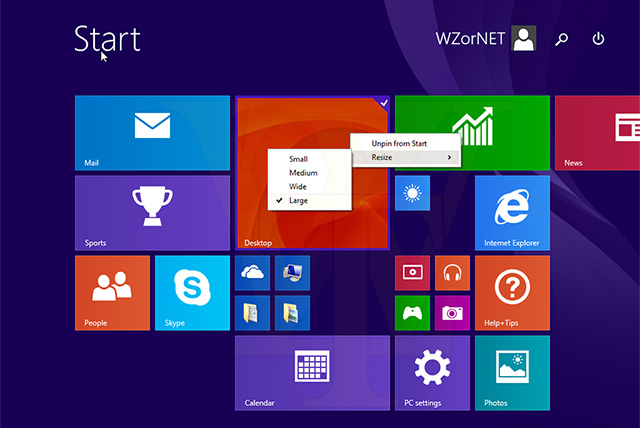
In addition, the Start Screen features new Power and Search buttons at the top-right corner of the UI which minimises the effort of navigation with the mouse every time.
The top-right corner of any running app now has the familiar 'X' button to close the app. The Taskbar can also be accessed directly from the Start Screen, which is again directed at minimising effort and making the interface more user-friendly.
Performance Improvements
Apart from tweaking the UI functionality for the desktop, the new Update 1 also comes with a handful of performance improvements such as better memory efficiency via Process Lifetime Manager and better system compatibility with Internet Explorer.
Windows for Free on Smaller Phones and Tablets
There is more good news for budget consumers looking to buy cheaper and smaller phones or tablets (less than 9-inches) as Microsoft is offering free Windows software starting with Windows 8.1 Update 1.
In addition, Windows 8.1 Update 1 comes in a smaller footprint and can be installed on any Windows phone or tablet having 1GB of RAM and 16GB of storage.
Availability and Release Date
Windows 8.1 Update 1 will be officially available from 8 April as free download via automatic Windows update.
Windows 8.1 Update
Microsoft unfortunately did not reveal too many details for the update to Windows 8.1, and also gave it no other name than Windows 8.1 Update - essentially ruling out a Windows 8.1 Update 2. The biggest change is the focus on UI-optimisation for mouse and keyboard users. This includes everything from Modern apps now displaying in the task bar (by pinning), to complete mouse control over apps in the Modern UI interface. The Windows Store UI will also be made mouse-optimised.Apart from boot/resume straight to desktop, Belfiore ran through a few other features, such as Internet Explorer's Enterprise Mode, the synced Bing-Cortana interests. The biggest reveal however, came after the developer side of the conference had begun, with the introduction of Universal Windows apps.
Universal Windows apps can be made by developers using a common code for PC, smartphones and tablets, via an updated Visual Studio 2013 suite. With this feature, Microsoft says it is not expecting developers to code one app that tries to work well on all form factors, but rather, one that is easily adaptable to the various Windows platforms, with the job of porting made easier with the common Windows runtime environment and programming languages used in developing them.
Here is a gist of the new features, tweaks and customization ported to Windows 8.1 Update 1:
Boot to Desktop by Default
The modern Start Screen that had bewildered new PC users trying to adopt the latest Windows platform is no longer a concern, as Microsoft has tweaked the system settings in Windows 8.1 Update 1 to make it boot directly to Desktop by default. Now the interface looks more traditional and familiar right out of the box.
Support for Universal Apps
The new Update 1 for Windows 8.1 brings support for universal apps, wherein an app created for one device can run on other devices including Windows, Windows Phone and Xbox One.
Windows Store App Navigation Gets Simpler
Windows Store App Navigation has become simpler and more interactive with the introduction of more clickable elements in Windows 8.1 update 1.
Web Browsing in Sync across Devices
Internet Explorer 11 which is part of the new update brings seamless browsing through the web, enabling the user to continue from the point where he/she left off.
Improved Taskbar and Start Screen
In line with rumours, Windows Store apps can now be pinned to the Taskbar, thereby doing away with the limitation associated with customising the quick-access feature.
In addition, the Start Screen features new Power and Search buttons at the top-right corner of the UI which minimises the effort of navigation with the mouse every time.
The top-right corner of any running app now has the familiar 'X' button to close the app. The Taskbar can also be accessed directly from the Start Screen, which is again directed at minimising effort and making the interface more user-friendly.
Performance Improvements
Apart from tweaking the UI functionality for the desktop, the new Update 1 also comes with a handful of performance improvements such as better memory efficiency via Process Lifetime Manager and better system compatibility with Internet Explorer.
Windows for Free on Smaller Phones and Tablets
There is more good news for budget consumers looking to buy cheaper and smaller phones or tablets (less than 9-inches) as Microsoft is offering free Windows software starting with Windows 8.1 Update 1.
In addition, Windows 8.1 Update 1 comes in a smaller footprint and can be installed on any Windows phone or tablet having 1GB of RAM and 16GB of storage.
Availability and Release Date
Windows 8.1 Update 1 will be officially available from 8 April as free download via automatic Windows update.